

If you are setting up workplace surveillance for the first time, the most immediate question is, “How many security cameras do I need?” It is a fair place to start, but the answer is rarely a single number. The right camera count depends on your office size, floor plan complexity, risk assessment level, and the specific areas you need to monitor.
This guide gives you a practical, step-by-step method for calculating how many security cameras you need for your specific office layout, along with camera type guidance, placement diagrams, legal considerations, and realistic cost ranges to help you plan a system that covers your space without overspending.
🎧 Listen to the blog:
The Importance Of Office Security Camera Planning
Installing a security camera for office use is not just about deterrence. A well-planned system creates documented evidence for insurance claims, provides legal protection in HR disputes, deters both internal theft and external intrusion, and supports compliance requirements in regulated industries. It also helps protect employees and visitors and gives management visibility into access patterns during and after business hours.
Poor planning, installing cameras without a coverage map, typically results in blind spots, redundant coverage of low-risk areas, and gaps in exactly the zones where incidents are most likely to occur. A structured approach prevents both under-coverage and unnecessary cost.
How Many Security Cameras Do You Need for Your Office
There is no universal answer, but there is a reliable baseline: one camera per 500 square feet of indoor office space, adjusted up or down based on layout complexity, risk level, and camera type. That baseline gives most offices a working starting estimate before accounting for specific coverage zones.
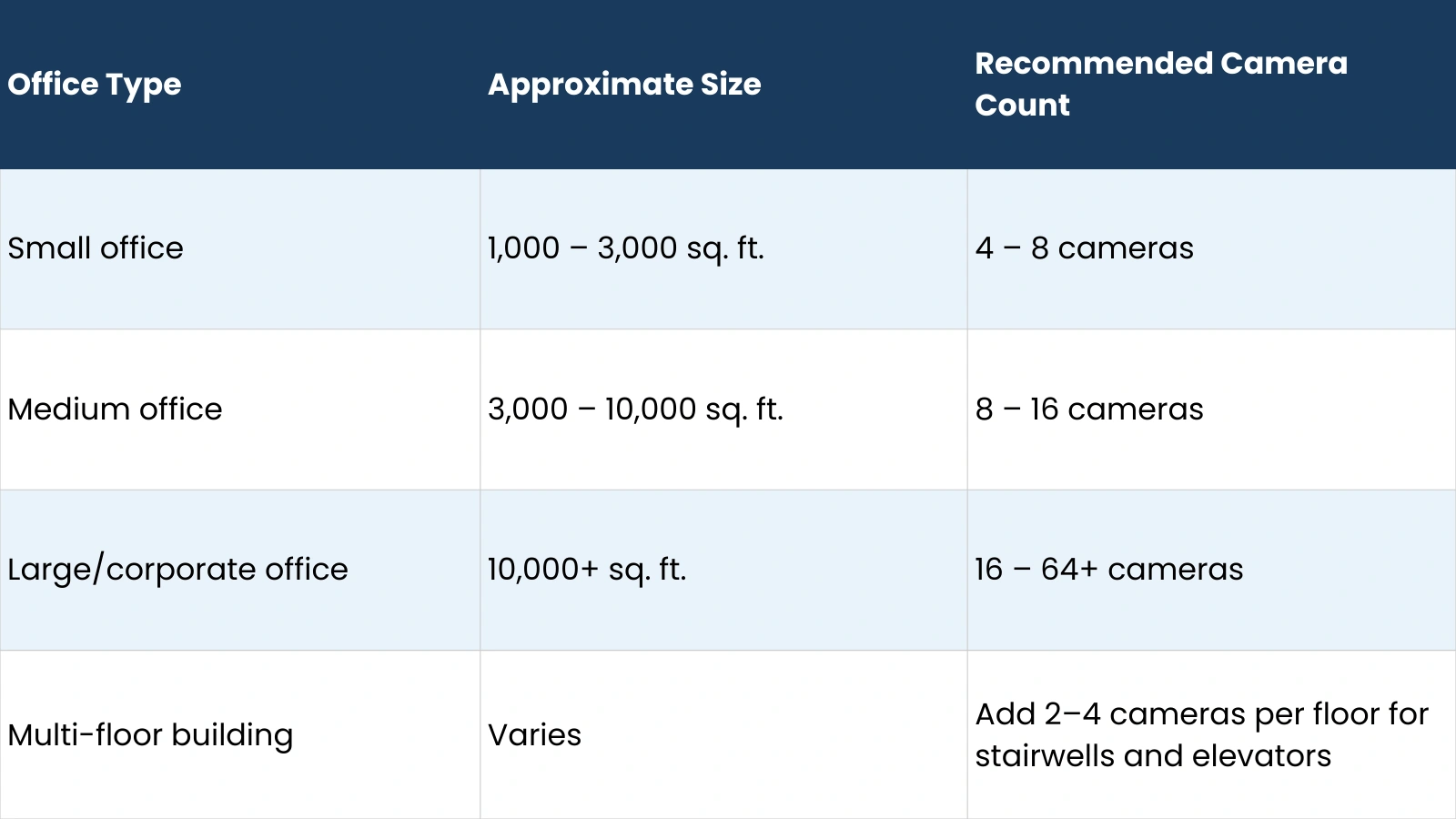
These ranges reflect open-plan layouts. If your office has many private rooms, corridors, or restricted areas, you will need more cameras than the baseline suggests. How many security cameras do I need for a complex floor plan can be 30 to 50 percent higher than a comparable open-plan space of the same square footage.
Camera Calculation Formula: How Many Security Cameras Do I Need?
Use this formula as your starting calculation:
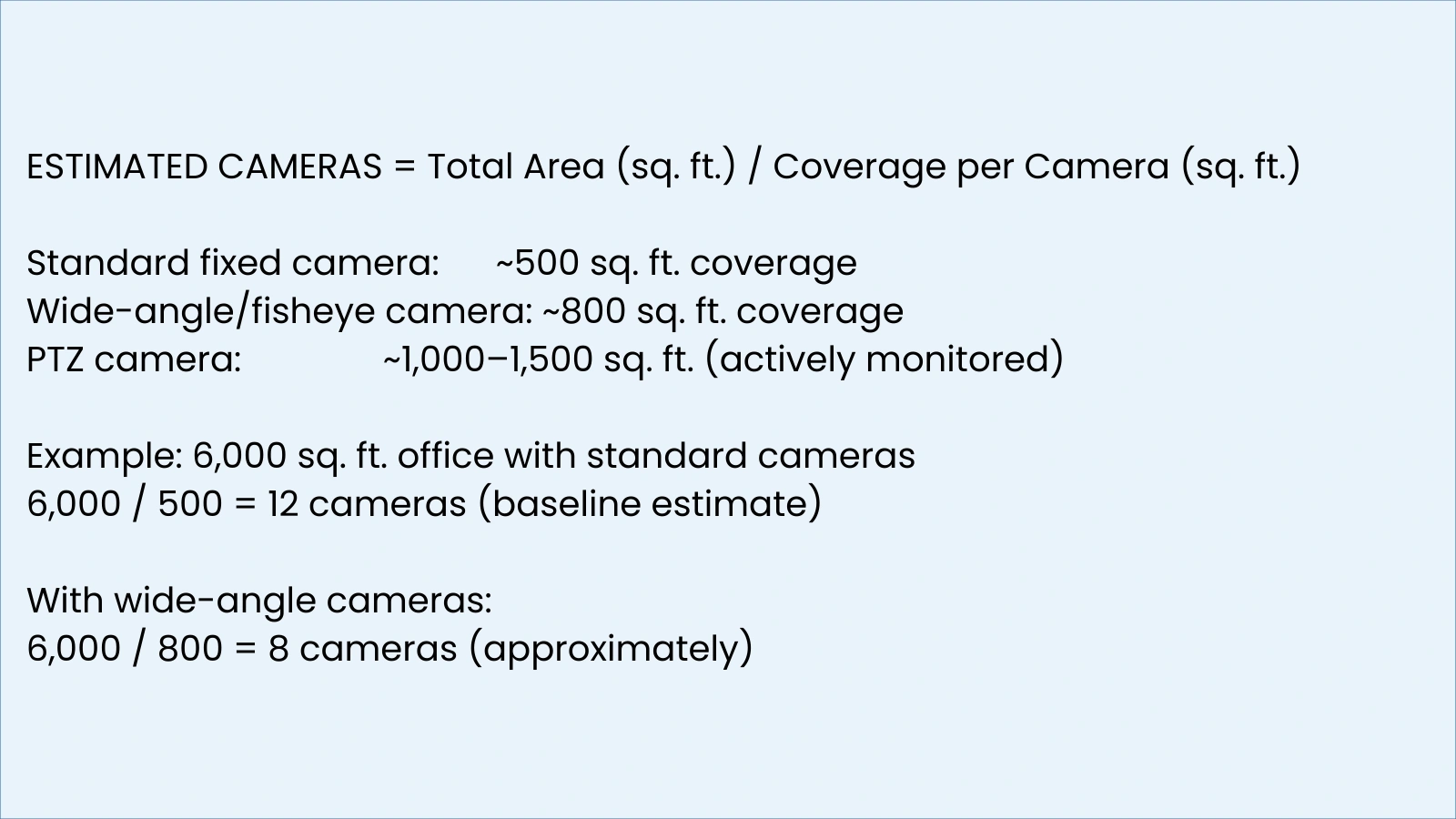
Add 10 to 20 percent to your baseline estimate to account for blind spots, irregular room shapes, and corridor angles. So for a 6,000 sq. ft. office: 12 cameras + 15% buffer = approximately 14 cameras as your planning figure. This is how many security cameras I need in a starting estimate; a professional site survey will refine this further.
Key Areas That Require a Camera for Office Security
Entry and Exit Points
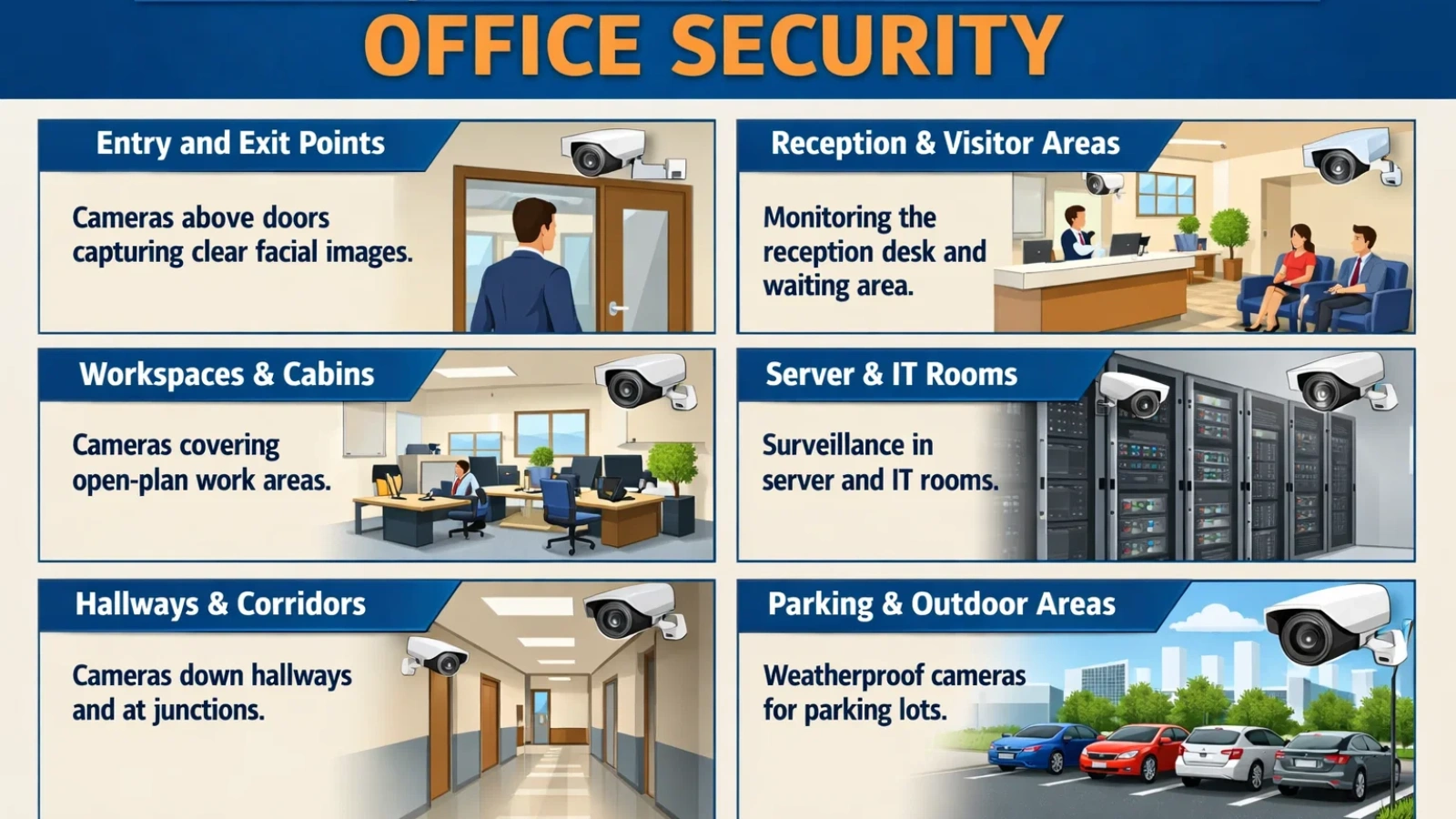
Every door that leads in or out of the office requires coverage, including emergency exits that may be used as unauthorized entry points after hours. Mount cameras above door frames facing inward to capture clear facial images of anyone entering. This is the single highest-priority coverage zone in any office.
Reception and Visitor Areas
The reception desk and visitor waiting area should be covered with at least one dedicated camera. This document records every visitor interaction, deters misconduct, and provides evidence in any access dispute. Position the camera to capture both the desk and the seating area without pointing directly into visitors’ faces, which can create glare on the footage.
Workspaces and Cabins
Open-plan workspaces typically need one to two cameras placed at diagonal corners for full coverage. Private offices and executive cabins generally do not require interior cameras; most organizations limit monitoring to common areas. When asking how many security cameras I need for a mixed open-plan and private office layout, count the open areas using the formula and add entry point cameras for each private room.
Server and IT Rooms
Server rooms and IT closets require dedicated cameras regardless of their size. These are high-value, high-risk zones where unauthorized access can cause significant harm. A single wide-angle or fisheye camera positioned above the door, covering both the entry point and the interior, is typically sufficient for a standard server room.
Hallways and Corridors
Corridors are frequently undercovered in basic camera plans. A standard corridor camera should be placed every 30 to 40 feet, positioned at a slight downward angle. For L-shaped or branching corridors, place a camera at each junction rather than trying to cover the bend from one end.
Parking and Outdoor Areas
Outdoor coverage requires weatherproof cameras rated IP66 or higher. Parking areas generally need one camera per 10 to 15 parking spaces, positioned 10 to 14 feet high to capture vehicle detection and pedestrian movement. Bullet cameras are the standard choice for outdoor ranges due to their focused coverage and built-in weatherproofing.
Also Read!
Why Is Real Time Threat Detection Revolutionizing Security?
Are Commercial Security Systems The Silent Shield Against Risk?
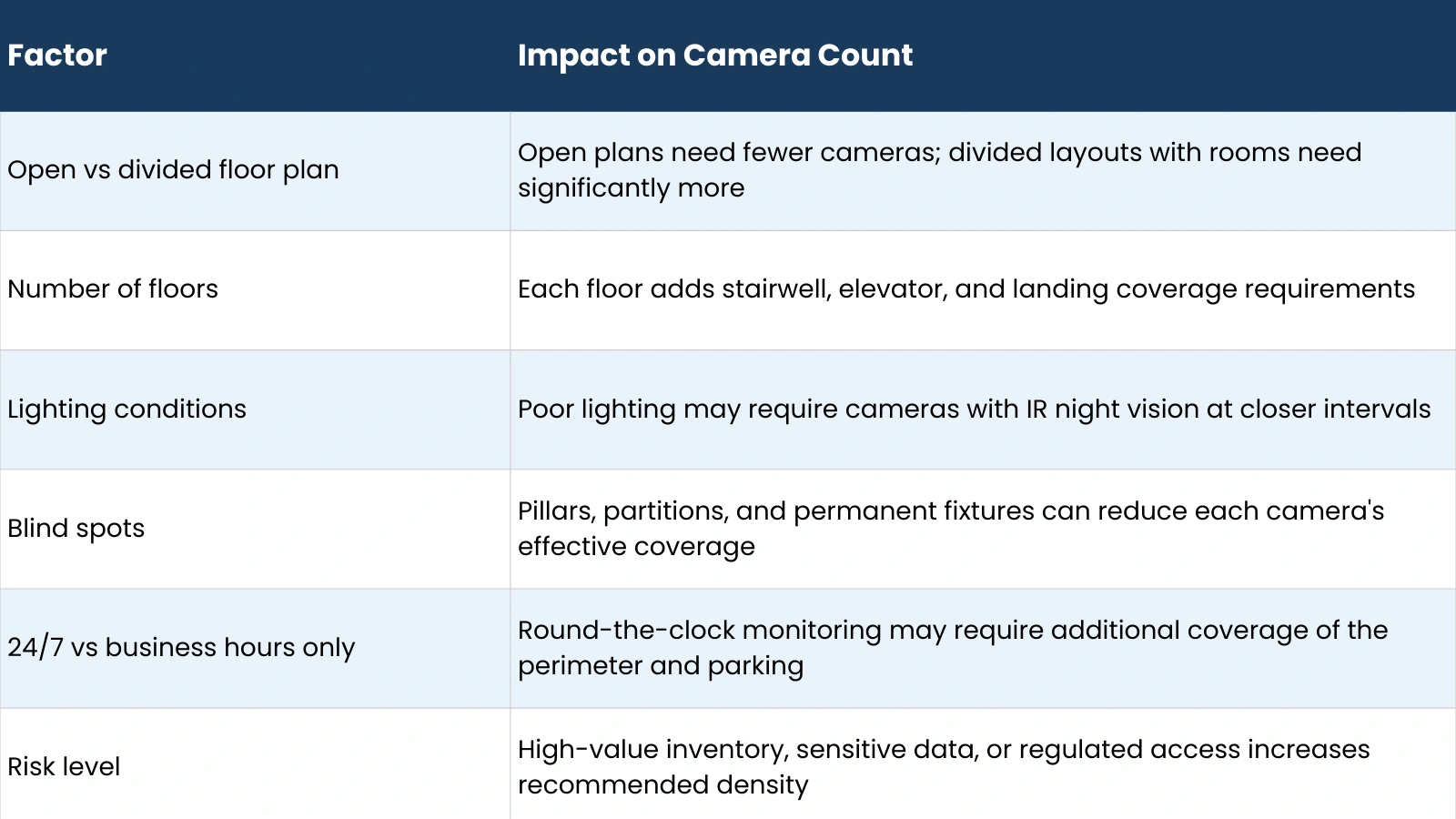
Factors That Affect How Many Security Cameras Do I Need
Choosing the Best Security Camera for Office Coverage
Camera type has a direct impact on how many security cameras I need. A PTZ camera can replace two to three fixed cameras in certain deployments, while a fisheye camera can cover an entire open-plan area that might otherwise require four standard cameras. Here is how each type performs in an office context:
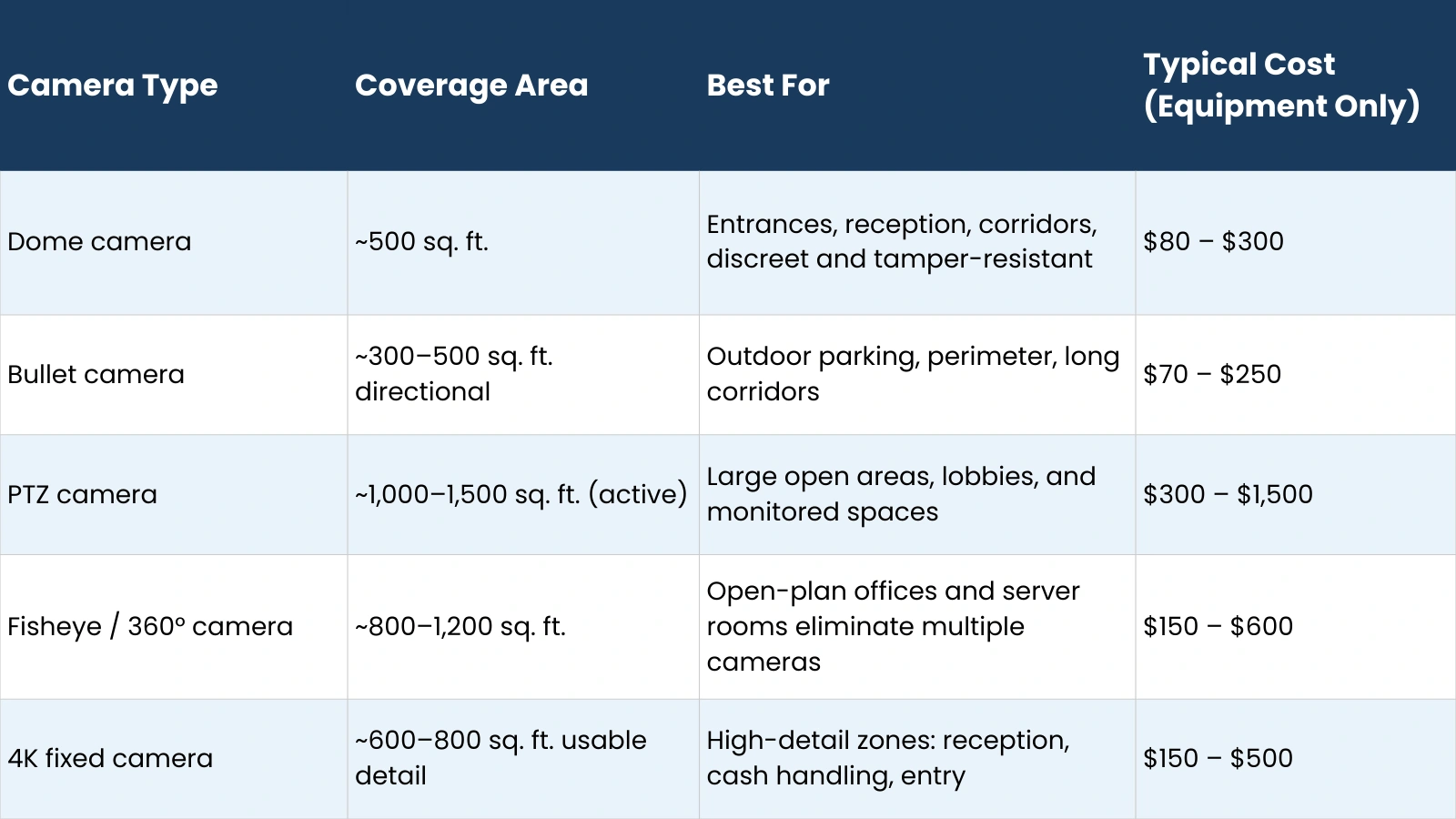
Selecting the best security camera for office use is not about choosing the most expensive option; it is about matching the camera’s field of view and resolution to the specific zone it will cover. A high-resolution 4K camera pointed at a wide open area will not capture usable facial detail at the edges. A wide-angle fisheye camera pointed at a narrow corridor wastes most of its field of view.
Top Security Camera System for Office Use: NVR, DVR, and Cloud Options
The recording and storage system you choose determines how footage is accessed, retained, and shared. There are three main architectures for a top security camera system for office use:
- NVR (Network Video Recorder): Works with IP cameras over a network connection. Supports higher resolution (up to 4K), remote access, and easier scalability. Recommended for most modern office deployments.
- DVR (Digital Video Recorder): Works with analog cameras over coaxial cable. Lower cost upfront, but limited in resolution and scalability. Suitable for small offices with simple requirements or existing analog infrastructure.
- Cloud-based systems: Cameras transmit footage directly to cloud storage. No local recorder required. Subscription-based pricing (typically $5 to $30 per camera per month). Best for small offices, multi-site businesses, or organizations that want remote access without managing local hardware.
- Hybrid systems: Combine local NVR storage with cloud backup. Provides redundancy; footage is accessible even if the local recorder is damaged or stolen. Recommended for offices with compliance or legal hold requirements.
For most offices in the 4 to 16 camera range, an NVR-based IP system offers the best balance of image quality, scalability, and remote access. If you are still asking how many security cameras I need for a multi-site operation, cloud or hybrid systems simplify centralized management significantly.
Sample Office Security Camera Layouts
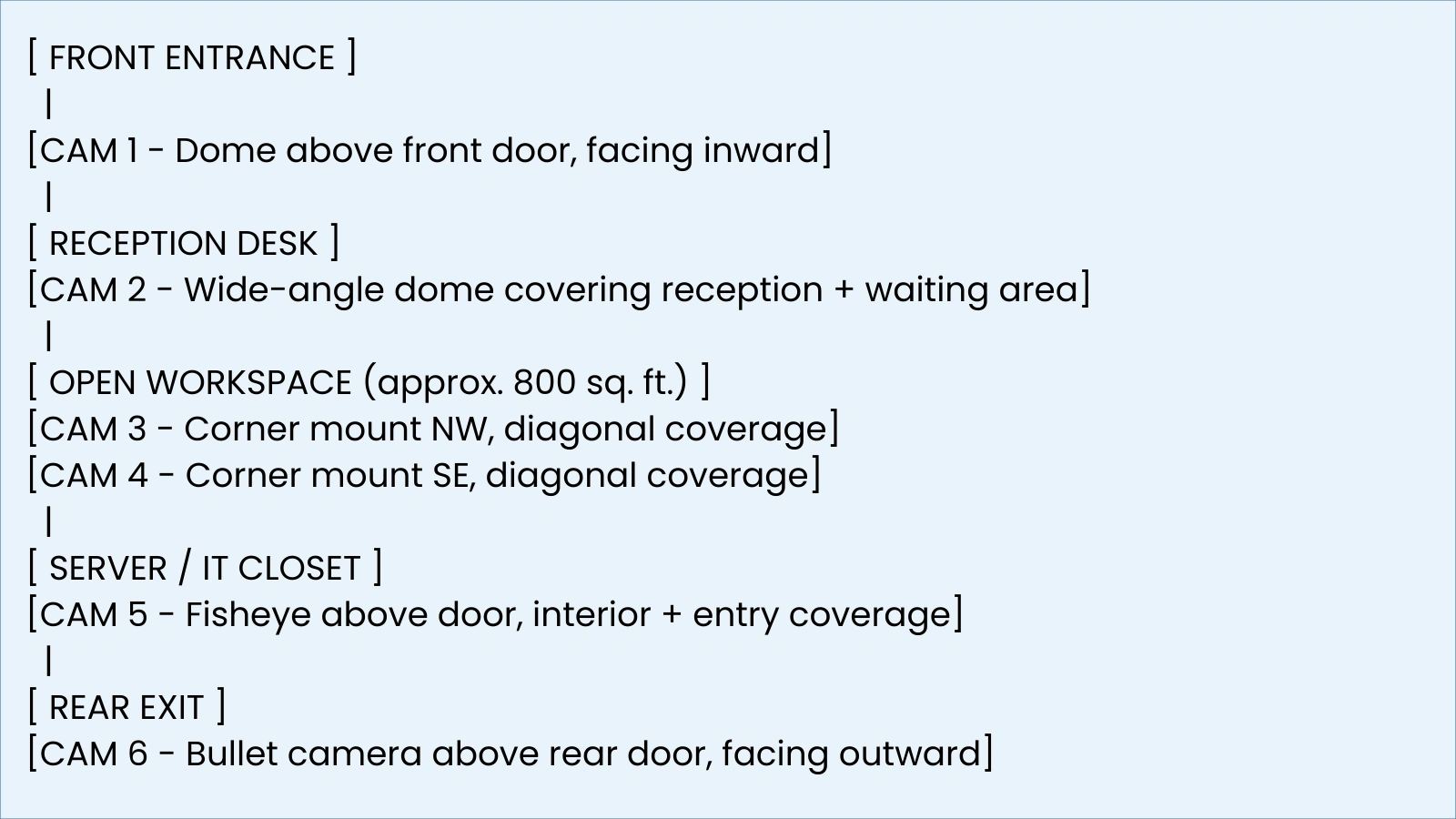
Startup Office Layout (approx. 1,500 sq. ft., 1 floor)
For a small startup office, the number of security cameras needed is typically 4 to 6. Here is a representative layout:
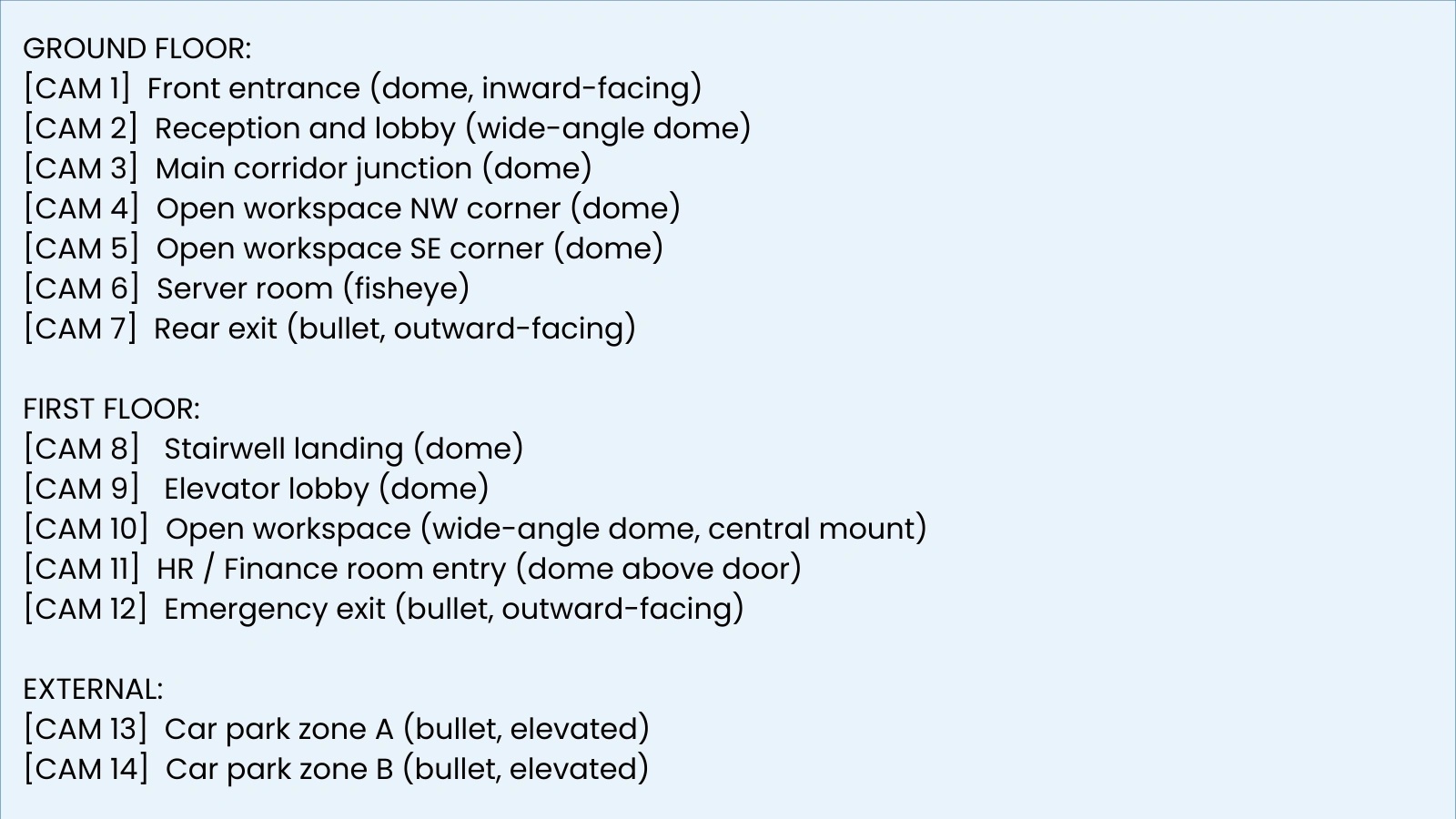
SME Office Layout (approx. 5,000 sq. ft., 2 floors)
For a mid-size business, how many security cameras do I need scales to 10 to 14 cameras across two floors:
Corporate Office Layout (10,000+ sq. ft., multi-floor)
At the corporate scale, how many security cameras do I need typically starts at 20 and scales with floor count, number of departments, and access control requirements. The standard approach is to map each floor independently using the 500 sq. ft. per camera formula, then add stairwell, elevator, lobby, and perimeter cameras as a fixed overhead per floor. A professional site survey is strongly recommended at this scale before finalizing any camera count.
Avoiding Blind Spots in Office Surveillance
Even a well-planned system will have blind spots if camera placement is not verified before installation. Common problem areas include:
Corridor bends and L-junctions: A straight-pointing camera cannot see around a corner. Place a camera at each junction rather than relying on one camera to cover the full length.
Pillar shadows: Structural pillars block camera lines of sight. Map pillar positions on your floor plan before finalizing camera positions, and ensure no pillar falls within a camera’s primary coverage zone.
Glass door reflections: Glass surfaces create glare and reflection artifacts on footage. Angle cameras to capture the area beyond the glass rather than pointing directly at the glass surface.
Staircase mid-sections: A camera at the top of a stairwell typically cannot see the bottom landings clearly. Position one camera at the top and one at the bottom for full staircase coverage.
Overlapping dead zones: Two cameras angled away from each other can create an uncovered gap between their fields of view. Overlap coverage slightly, by 10 to 15 percent, to eliminate gaps.
The most reliable method for confirming blind spot coverage before installation is a site walk-through with your installer using temporary camera mounts or a coverage planning tool. Reviewing footage from test positions before final mounting saves significant re-installation cost. This step is particularly important when determining how many security cameras are needed for a floor plan with irregular geometry or heavy internal partitioning.
Legal And Privacy Guidelines For Office Security Cameras
Deploying a camera for office security is subject to workplace monitoring laws that vary significantly by country and, in the US, by state. Understanding the legal framework before installation protects the organization and its employees.
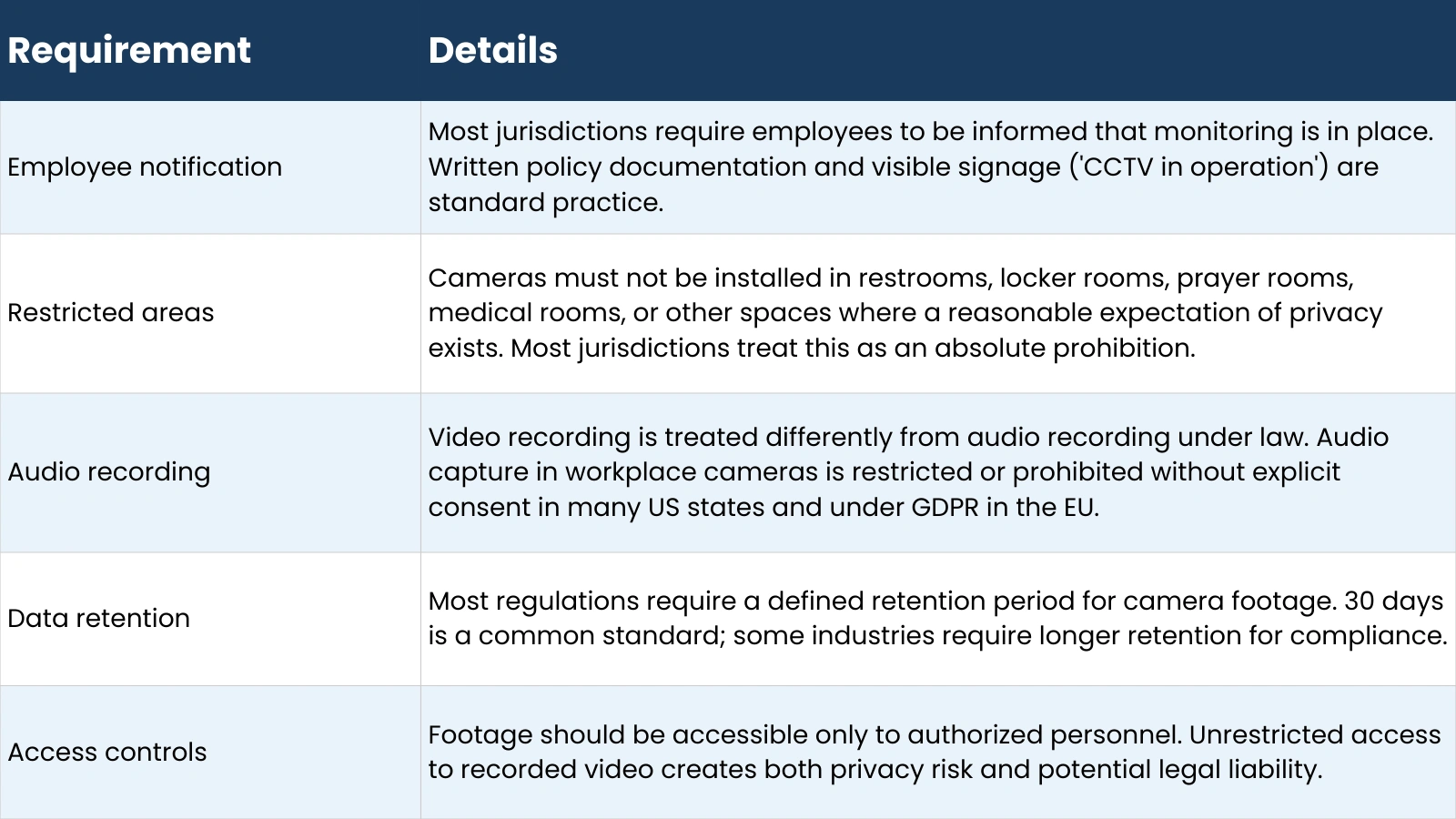
In the EU and UK, GDPR and UK GDPR require that camera monitoring be proportionate to a legitimate business purpose, that employees be informed, and that a Data Protection Impact Assessment (DPIA) be conducted for systems with significant monitoring scope. In the US, federal law permits workplace monitoring, but state laws, particularly in California, Connecticut, and Delaware, impose additional notice requirements.
Office Security Camera Cost vs Quantity
Budget directly affects how many security cameras I need in practice, not just how many would be ideal. Here are realistic cost ranges for planning purposes:
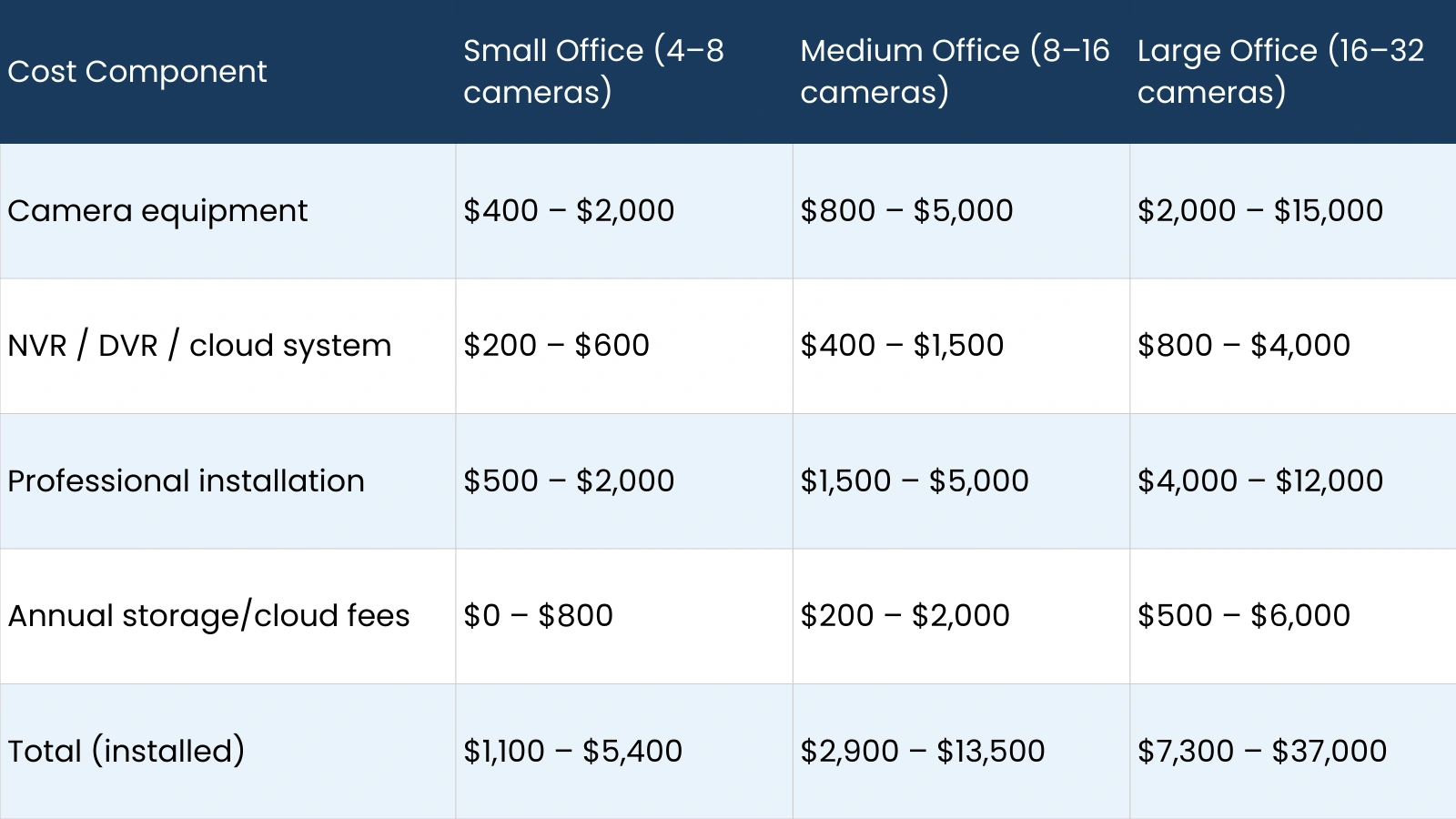
Higher-resolution cameras (4K) and PTZ models increase equipment cost but can reduce total camera count, which partially offsets the unit price premium. Cloud storage subscriptions add an ongoing cost but eliminate the need for local recorder hardware and provide off-site footage backup automatically.
Pro Tips to Optimize Your Office Camera Count
These practices help reduce the total camera count without compromising coverage:
- Use wide-angle or fisheye lenses in open areas: A 180-degree fisheye camera in a corner can eliminate the need for two or three standard cameras in an open-plan workspace.
- Invest in higher resolution where it matters most: A 4K camera at the entrance captures usable facial detail from greater distances, reducing the need for multiple close-range cameras in the same zone.
- Combine motion detection with fixed coverage: Use motion-triggered recording to reduce storage costs and enable smarter alert systems rather than continuous recording across all channels.
- Integrate indoor and outdoor systems: A unified NVR that handles both indoor and outdoor cameras simplifies management, reduces hardware cost, and gives you a single interface for reviewing footage across the full site.
- Scale plan: Choosing a top security camera system for office use with room to add channels later avoids replacement costs when you expand. Most NVR systems support 8, 16, or 32 channels, but for your current count, with headroom.
Consider AI analytics cameras: AI-enabled cameras can detect specific behaviors, track objects, and generate automated alerts, which can reduce the number of cameras needed to maintain meaningful situational awareness in large areas.
AI Video Intelligence Tools That Enhance Office Surveillance
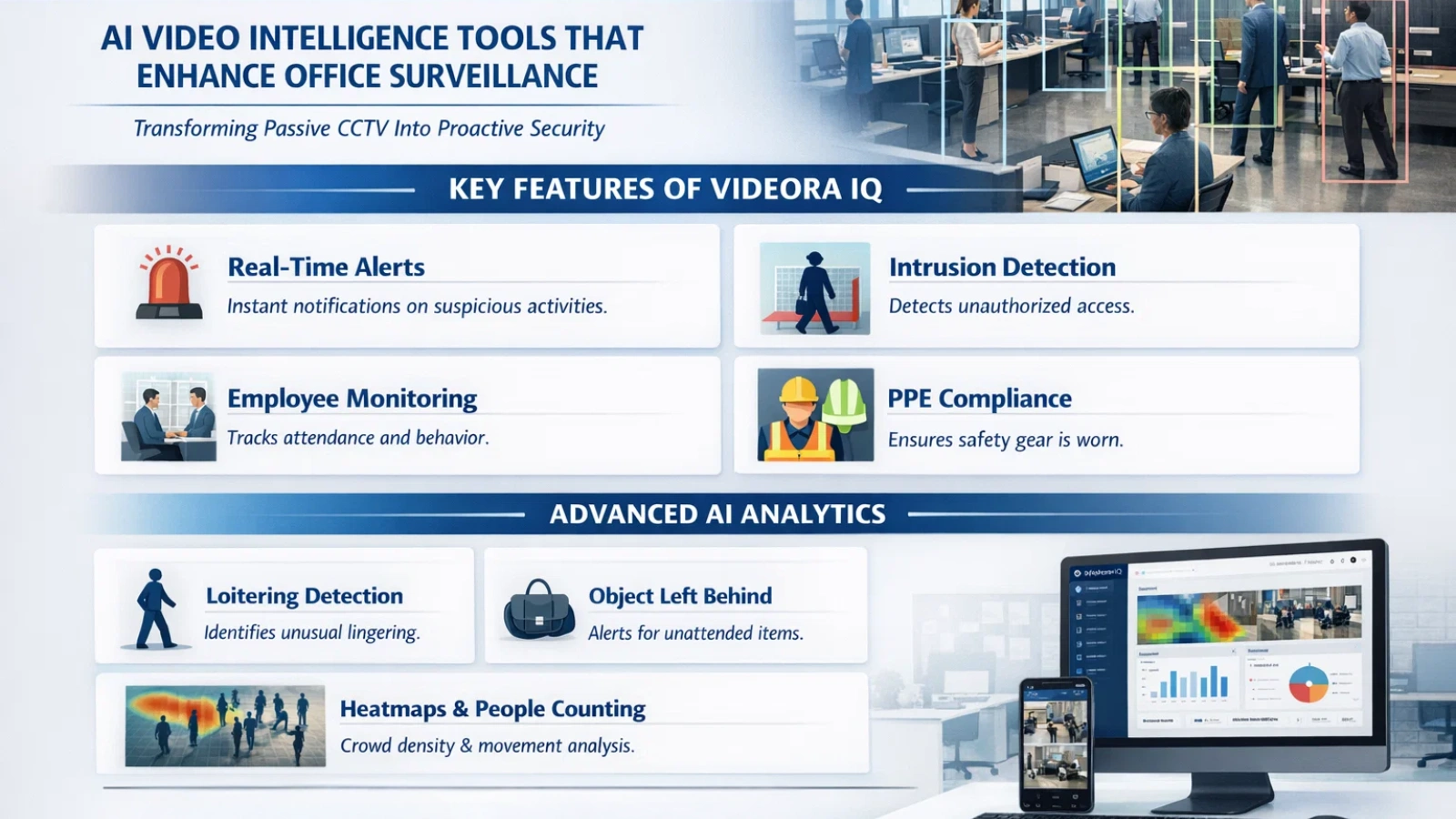
As office security systems evolve, traditional CCTV monitoring is increasingly being supplemented with AI-powered video analytics platforms. These tools do not replace your cameras but enhance their functionality by turning passive footage into actionable intelligence.
One such platform is VideoraIQ, an AI video intelligence solution developed to make office surveillance more proactive, automated, and scalable.
What Is VideoraIQ?
VideoraIQ is an AI-powered video surveillance platform that transforms standard security cameras into intelligent monitoring systems. Instead of simply recording footage, the platform analyzes video streams in real time, detects security events, and triggers alerts automatically.
This means your office security team does not need to manually watch screens continuously; the system flags incidents as they happen.
Key Features of VideoraIQ for Office Security
Below are the core capabilities relevant to office and corporate environments:
1. Face Recognition & Access Monitoring
VideoraIQ can identify and track individuals using facial recognition analytics. This helps monitor employee entry, visitor access, and restricted-zone movement for audit and compliance purposes.
2. Intrusion Detection
The platform detects unauthorized movement in restricted areas and sends real-time alerts, enabling faster response to security breaches.
3. Object & Unattended Baggage Detection
AI object detection identifies suspicious or abandoned items within office premises, which is particularly useful in lobbies, reception zones, and public-facing workspaces.
4. Unauthorized Access Alerts
The system generates automated alerts when individuals attempt to enter restricted rooms such as server areas, finance departments, or executive cabins.
5. Line-Crossing & Virtual Perimeter Detection
Security teams can define virtual boundaries. If someone crosses these digital lines, the system triggers alerts, useful for monitoring exits, stairwells, and perimeter zones.
6. Fire & Smoke Detection
VideoraIQ includes AI-based fire and smoke recognition, enabling early detection and faster emergency response within office facilities.
7. License Plate Recognition
For offices with parking facilities, the platform can log and track vehicle license plates to monitor entry, exits, and unauthorized vehicles.
8. Real-Time Alerts & Remote Monitoring
Because the platform is cloud-based, security teams can monitor live footage and receive alerts from any location, supporting multi-office or remote management setups.
Organizations can sometimes optimize camera placement and rely on intelligent detection rather than simply increasing camera density.
Conclusion
There is no single correct answer to how many security cameras do I need; the right number is a function of your floor plan, office type, camera technology, risk level, and budget. What this guide gives you is a structured method: start with the 500 sq. ft. per camera baseline, apply the formula, map your specific coverage zones, select camera types to match each zone, and add a 10 to 20 percent buffer for blind spots and irregular geometry.
Strategic placement consistently outperforms sheer camera count. A smaller number of well-positioned, appropriate cameras will deliver better coverage and more usable footage than a larger number of cameras installed without a clear coverage plan. Invest in a professional site survey before finalizing your system; it is the single step most likely to save both money and re-installation effort.
Whether you are equipping a four-person startup or a multi-floor corporate headquarters, the planning process is the same: define your coverage zones, apply the formula, select the right camera type for each zone, and verify coverage before the first camera goes on the wall.
Frequently Asked Questions
How many security cameras do I need for my office?
The standard baseline is one camera per 500 square feet of indoor space, adjusted for layout complexity and risk level. A small office of 1,000 to 3,000 sq. ft. typically needs 4 to 8 cameras. A medium office of 3,000 to 10,000 sq. ft. needs 8 to 16. Large or corporate offices above 10,000 sq. ft. typically need 16 to 64 or more, depending on floor count and layout. Add 10 to 20 percent to your baseline calculation to account for blind spots and irregular geometry.
What is the ideal number of security cameras for office security?
There is no single ideal number; the right count is determined by your floor plan, the number of entry points, high-risk zones, and the camera types you select. The formula (Total Area / Coverage per Camera) gives you a reliable baseline. Wide-angle and PTZ cameras can reduce the total count. A professional site survey gives you the most accurate final figure. Asking how many security cameras I need without a floor plan review will always produce an estimate rather than a plan.
Which is the best security camera for office use?
For most office environments, dome cameras are the most practical choice; they are discreet, tamper-resistant, and provide wide-angle coverage suitable for indoor zones. PTZ cameras are best for large open areas or actively monitored spaces. Fisheye cameras are ideal for open-plan workspaces where a single unit can replace multiple fixed cameras. Bullet cameras are the standard choice for outdoor parking and perimeter coverage. Match camera type to zone rather than selecting one type for the entire system.
How much area does one office security camera cover?
A standard fixed dome or bullet camera covers approximately 500 square feet under typical indoor conditions. Wide-angle and fisheye cameras cover 800 to 1,200 square feet. PTZ cameras can cover 1,000 to 1,500 square feet when actively managed. Camera placement height, lens angle, and lighting conditions all affect effective coverage. When planning how many security cameras you need for your space, use these figures as a baseline and verify with a site walk-through before finalizing camera positions.
Are there areas where I cannot install security cameras in an office?
Yes. Restrooms, locker rooms, medical or wellness rooms, and prayer rooms are universally off-limits in most jurisdictions. Installing cameras in spaces where employees have a reasonable expectation of privacy is typically illegal and can create significant legal liability. Most organizations also avoid camera installation in break rooms, though this varies by jurisdiction and company policy. Always consult applicable local law and your legal team before finalizing camera positions in any space where privacy expectations may apply.

