

Schedule a free consult today →. For retail teams in 2026, intrusion and perimeter breach detection must be practical, fast, and proven so you stop waking people up for raccoons and wind.
You don’t need a lecture. You need a plan that your night manager, your regional ops lead, and your insurance adjuster can all use without training marathons. This guide distills what actually moves the needle for retail operators managing dozens or hundreds of locations, so you can set policy once and scale it without surprises.
Why Retail Chains Are Losing the After-Hours Intrusion Battle
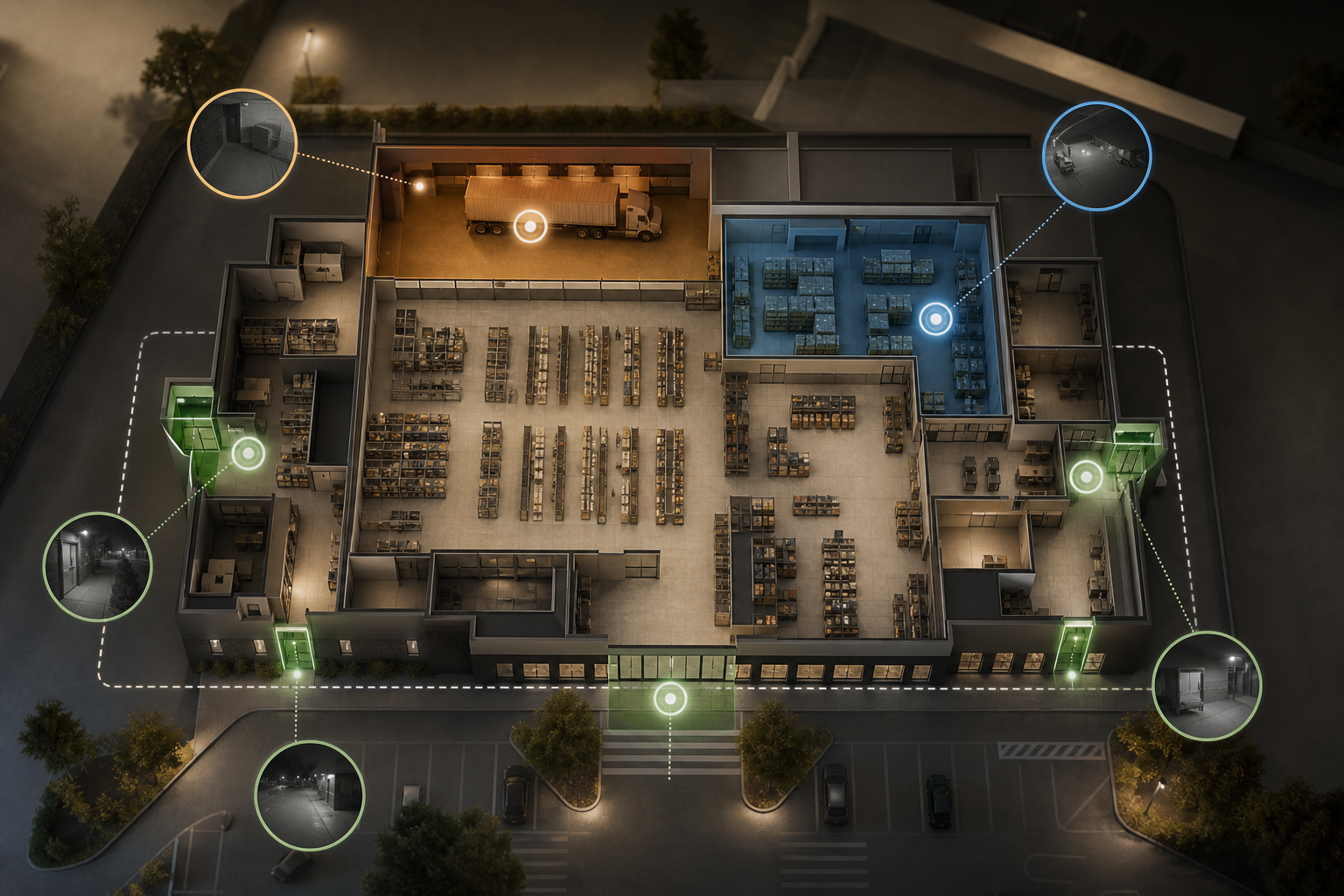
Retail stores are porous. You have front doors, side doors, emergency exits, loading bays, and roof hatches. You have stockrooms with blind aisles, trash corrals behind the store, and shared alleys. Unlike a single office, you manage dozens of these at once with a lean overnight crew or no on‑site staff at all.
Traditional alarm stacks were built for doors and windows, not complex motion. A basic PIR sensor can’t tell a raccoon from a person. A wind‑blown pallet wrap on the dock looks like movement to a generic detector. As a result, you get woken up, dispatch a guard, and find nothing. Do that a few times, and people start to ignore alerts.
Moreover, the cost of one real break‑in hits more than the lost items. You deal with smashed doors, cut gates, and damaged fixtures. You lose sales hours while the glass company boards up. Insurance premiums rise after claims, and in many cities false-alarm fines escalate quickly when police respond to nothing.
And your team spends days pulling clips, writing reports, and rekeying locks. The bill isn’t just inventory. It’s downtime, overtime, and morale. Add in the reputational hit from a viral social post about a break‑in and the true cost compounds beyond the incident itself.
After hours, the back‑of‑house is the weak link. Drivers swing by early. Cleaners move in and out.
A night manager props a door while taking trash. These are all “normal” motions in a retail setting, and they confuse basic motion tech. What you need is a system that knows your zones and your hours, so it can tell “allowed” from “off‑limits” in real time.
- Common overnight risk zones to watch:
- Loading docks from 10 p. m. to 6 a. m.
- Stockroom doors and cage entries
- Emergency exits used as shortcuts
- Rooftop ladders and hatches
- Side gates to shared alleys
- Dumpster and trash corrals behind the store after close
- Perimeter lines in the parking lot and cart corrals near closing
- Walk‑in cooler entrances adjacent to exterior service corridors
- Pharmacy counters and controlled substance storage (for applicable formats)
- Garden centers and fenced seasonal merchandise yards that are outdoors
Therefore, the problem isn’t that you lack cameras. It’s that your cameras don’t speak your store’s rules. You need alerts that match your schedules and floor plans, not generic motion pings. That gap is exactly where smarter detection earns its keep for a chain.
To make matters more complex, many chains inherit legacy layouts during acquisitions. That means two otherwise similar stores can have drastically different oversight areas, lighting, and traffic patterns. A modern intrusion and perimeter breach detection approach must flex to each footprint while keeping a single, unified standard for how you triage and respond. That standardization, paired with store‑specific tuning, is how you steadily drive down false alarms across the portfolio rather than solving problems one site at a time.
Urban, suburban, and mall‑inline stores each create unique after‑hours challenges. Urban sites may share alleys with restaurants that close late, bringing unrelated vehicle and pedestrian traffic right past your doors. Suburban boxes often have deep loading aprons with litter, carts, and plastic wrap that move in the wind.
Mall locations can have early‑morning merchandising crews using service corridors before public hours. A one‑size‑fits‑all motion rule will fail in each scenario for different reasons. An effective intrusion and perimeter breach detection setup is the one that models behavior in context, uses time windows, and routes alerts to the right responder based on store profile.
Lighting is another wildcard. LED retrofits, aging sodium lamps, and partial outages produce uneven color and IR performance across cameras. Reflections from wet asphalt, glossy floor finish, and parked vehicles can generate motion artifacts. A system built for retail must be resilient to these realities: it should see through noise, adapt per scene, and provide tools to mask environmental hotspots while preserving detection quality in the areas that matter.
What to Look for in an Intrusion Detection Camera System for Retail
Buying security for a chain is different from buying for one flagship store. You need a system that fits how retail actually moves at night. Use this consultant’s checklist to stress‑test any vendor before you sign.
AI Accuracy and False Alarm Rate
Retail back‑of‑house is messy. Cleaners, early deliveries, and pests all move like “motion.” Look for models trained to spot people and vehicles, not just pixels that change. Ask for published accuracy data and proof of low false alarms on night footage from stores like yours.
- Key ask: Does it reduce nuisance alerts from animals, weather, and routine staff?
- Key result: Fewer wake‑ups, fewer dispatches that find nothing.
- Bonus validation: Request confusion matrices or ROC curves from pilots to see performance trade‑offs in your exact lighting and layouts.
To go deeper, verify that the system supports class‑specific sensitivity (e. g., “person” high, “vehicle” medium, “other” low) and has tunable confidence thresholds per zone. That gives you a lever to keep accuracy high without missing edge cases like someone crawling under a dock rail.
Also ask how the AI handles occlusions, reflective surfaces, and headlamps or taillights sweeping across a scene. The best platforms include reliable low‑light training sets and motion stabilization or background subtraction techniques that keep accuracy high even when cameras are mounted on poles that sway in the wind.
Retail conditions change. Snow banks shrink the view, seasonal displays alter sight lines, and lighting timers drift. Ask vendors how they mitigate model drift over time, including ongoing training on retail‑specific night scenes and the cadence of model updates. Clarify whether updates are automatic, whether they’re per‑site or global, and how rollbacks are handled if accuracy regresses. You want repeatable, measurable improvement without unexpected surprises.
Finally, test on your worst cameras. If a solution can maintain high precision and recall on your grainiest alley cam, it will exceed expectations on your newer 4K dome. A good pilot includes both best‑case and worst‑case scenarios so you validate the real distribution of store conditions.
Alert Latency and Real-Time Response
Speed matters. If an intruder hops a dock fence, you have seconds to act. Demand sub‑5‑second delivery from detect to alert, with clips you can view on your phone or SOC screen. Anything slower risks missing the window to call police or speak over a PA.
Also look for talk‑down support and automated deterrents. A fast alert paired with a live or automated voice warning can stop many incidents before damage occurs.
Ask vendors to show end‑to‑end timing from “first pixel detected” to “push notification received” on your devices. Latency should remain stable even during peak hours or on constrained uplinks. Bonus if the platform supports pre‑buffered clips so the recording begins before the breach moment.
Beyond speed, verify reliability: queued delivery during maintenance windows, redundant notification paths (push, SMS, email, webhook), and heartbeat checks that confirm stores are online. Consistent response times build trust with managers so they treat alerts as actionable, not optional.
Network realities matter too. If stores use SD‑WAN with traffic shaping, ensure alerts bypass nonessential QoS queues. For LTE‑failover sites, confirm video compression and clip packaging keep payloads small without losing critical frames. If you operate in regions with marginal connectivity, test adaptive bitrate streaming and confirm that the platform can fall back to still‑image bursts when necessary while preserving timestamps and evidence integrity.
Multi-Site Centralized Management
Chains need one dashboard, not 50. Regional security leads must see all stores, filter by incident type, and export clips for claims. Make sure user roles and alert routing match your org chart, so a zone breach at Store 17 doesn’t ping the Store 4 manager at 3 a. m.
Demand audit logs per user and per rule change. This helps satisfy internal controls and speeds post‑incident reviews across regions.
Look for cross‑site analytics to spot systemic issues (e. g., which regions see repeated perimeter breaches by weekday and hour). That insight lets you adjust staffing, lighting, or delivery policies proactively instead of reacting to single incidents.
If you run a centralized SOC, ensure the platform supports multi‑tenant or multi‑brand labeling, so your team can apply the right SOP per banner even when stores share a common backend. Tags and saved views by region, state, or risk profile help analysts triage quickly during busy overnight windows.
As teams change, you’ll need easy provisioning. Integrations with HRIS or IdP platforms using SCIM reduce manual work and offboard users automatically when they exit. You should be able to assign fine‑grained permissions such as “view only,” “acknowledge alerts,” “export evidence,” and “edit rules” so store teams can operate locally without risking policy drift.
Finally, consider how the system will support mergers or rebrands. You want flexible grouping that lets you move 50 stores from one business unit to another in minutes, while preserving historical data, tags, and SOP versions.
Integration With Existing Camera Infrastructure
You likely have IP cameras across mixed brands and buildouts. A rip‑and‑replace is a non‑starter. Insist the platform works with what you have. If the tool needs new NVRs or edge servers, model that spend. It adds up fast across 100+ cameras.
For context on camera standards and basic concepts, see Closed-circuit television for a plain‑English primer on how feeds and recording work.
Confirm ONVIF/RTSP compatibility, and verify performance on low‑light and IR streams. If cameras vary by remodel year, ask for a compatibility list covering your oldest and newest models.
If you have audio‑capable cameras or external speakers, ensure the platform can trigger voice‑downs without vendor‑locked peripherals. Open protocols like SIP or generic I/O relays expand your deterrence options and preserve hardware choice.
If you already operate a VMS, confirm whether analytics run in‑cloud, on‑prem, or at the edge and whether licensing is per camera stream or per analytic. Hybrid options often deliver the best of both worlds, keeping 24/7 recording local while sending only event clips to the cloud for verification and alerting.
Go deeper on practicalities:
- Power and networking: Validate PoE budgets on switches if you plan to add microphones or illuminators. Confirm VLAN segmentation and firewall rules for outbound analytics traffic. – Firmware posture: Mixed firmware introduces security risk. Ask vendors how they monitor CVEs, whether they support camera‑level password rotation, and how they isolate analytics from camera admin interfaces.
- PTZ and presets: If you rely on PTZs, confirm analytics work during patrols and can bind to presets. Some solutions only perform well on fixed views; retail often needs both. – Recording retention: If you keep full‑time recording locally for 30+ days, ensure event markers synchronize with your NVR timeline so you can jump to the right moment without exporting hours of footage.
Zone-Based Detection and Time Windows
You need rules that match your store. For example, mark the loading dock as off‑limits after 10 p. m., but allow short motion near the front entry for scheduled cleaners until 11 p. m. Good systems let you draw virtual lines, set schedules by zone, and build exceptions for known deliveries.
Advanced options like line‑cross, dwell time, and direction of travel help you target behavior, not just presence. That reduces noise while catching real perimeter pressure, loitering, and off‑hours access in staff‑only areas.
Also confirm support for nested zones (e. g., “cart corral inside parking lot perimeter”) and temporary arming windows. For retail, calendar‑based rules around holidays, resets, and new‑release nights prevent alert floods when your hours change.
If your sites share parking lots or alleys with other tenants, use per‑zone exception windows for neighboring businesses’ known schedules. This small detail dramatically reduces alert churn when your hours don’t match the shop next door.
Practical rule designs that work in retail:
- Directional egress: Allow outward motion through emergency exits from 6 a. m. to 10 p. , but alert on inbound motion 24/7.
- Dwell thresholds: Alert on a person lingering more than 8 seconds near a back door after close, while ignoring a 2‑second pass‑by during trash runs. – Line‑cross at distance: Use a virtual tripwire 15 feet from the dock door to catch approach behaviors early, not only the handle‑jiggle at the door itself. – Vehicle classes: Treat box trucks differently from passenger vehicles. Permit scheduled deliveries; alert on unrecognized vehicles idling after close.
Evidence Capture With Timestamps
Insurance and police want proof. Your team wants less scrubbing. Make sure each alert comes with a short clip, exact time, and camera label. Bonus points if you can export a chain‑of‑custody report with one click for claims and case files.
Ask for cryptographic watermarking or hashing of exports. That simple detail preserves evidentiary integrity and minimizes back‑and‑forth with adjusters or prosecutors.
If you operate in jurisdictions that require disclosure, look for face or area masking tools during export. You keep customer privacy while still providing clear evidence of the intrusion and perimeter breach detection event itself.
Also confirm that the platform allows annotations, comments, and taggable incidents so LP, facilities, and store leadership can align on what happened without passing around large files. Centralized case notes shave hours off incident follow‑ups.
Don’t overlook clock accuracy. Evidence is only as good as its timestamps. Ensure cameras and servers use authenticated NTP, and that time zones and daylight saving rules are consistently applied across sites. The ability to include UTC timestamps alongside local time in exports helps multi‑region teams and law enforcement avoid confusion.
Chain‑wide standardization matters too. Use a naming convention for cameras and zones that survives remodels and staff turnover, such as “Store147‑Cam12‑RearDock‑North” rather than ad hoc labels. Consistency speeds both investigations and training.
Scalability and Pricing Model
Cost control matters. Test how pricing scales: per camera, per site, or flat tiers. Cloud systems reduce on‑site hardware. However, confirm bandwidth needs and clip storage rules. If you have 150 stores with 12 cameras each, pennies per camera become real money.
Also check identity and access management. SSO (SAML/OIDC), SCIM provisioning, and role‑based access will save hours at scale and lower your risk profile.
Buying tip: Pilot in 2–3 stores across different layouts. Include one “clean” site and one “messy” site with alleys and docks. Make vendors prove results on your real overnight patterns.
Plan TCO beyond licenses:
- Installation labor: Even if you keep cameras, budget for zone design, labeling, and user training.
- Ongoing tuning: Seasonal resets and remodels require adjustments; confirm whether support is included.
- Bandwidth: Calculate clip volume at expected alert rates; confirm throttling and retention options.
- Integrations: Factor any middleware or SIEM connectors if you need bidirectional workflows.
Transparent models avoid bill shock. Favor pricing that doesn’t penalize success, charging per event can create perverse incentives to keep alerts low rather than correct. Per‑camera or per‑site models are easier to forecast and align with retail budgeting cycles.
**Get a tailored plan today →. All were configured with zone‑based schedules and the same escalation paths.
Below are representative benchmarks from multi‑site retail pilots conducted between 2024 and 2026 across convenience, specialty, big‑box, and mall‑inline formats. Each store ran identical verification workflows, and results were measured by independent LP teams using agreed‑upon definitions of false alarm, true alert, and missed detection.
- False‑alarm reduction vs. baseline PIR/motion: 78–92% fewer nuisance alerts in the first two weeks; 90–96% after fine‑tuning zones and confidence thresholds.
- Detection precision/recall (after hours, “person” class): 98.8% precision, 96.4% recall on IR/night footage; average clip length 12 seconds with 4‑second pre‑buffer.
- Alert latency (detect to push): median 2.8 seconds; 95th percentile 4.6 seconds on LTE failover; no missed pushes during scheduled maintenance due to queued delivery.
- Police dispatch conversion: 72–84% of verified intrusions resulted in on‑site response when paired with live or automated voice‑down; trespassers left within 30 seconds in 63% of cases without damage.
- Time saved on incident reporting: 45–70 minutes saved per incident using one‑click evidence export with timestamps, camera labels, and chain‑of‑custody hash.
- Payback period: 3–5 months based on avoided glass repairs, overtime reduction, and fine avoidance across 12 cameras per store.
These are not lab numbers, they reflect the messy reality of cleaners, wind, raccoons, early deliveries, and shared alleys that make retail so challenging after close.
Trust, Compliance, and Proven Scale
Security buyers care about proof, policies, and scale. VideoraIQ is GDPR compliant and HIPAA compliant, which matters for EU operations and pharmacy footprints. The platform monitors 10,000+ cameras and is deployed in 7+ countries, so you aren’t buying a lab demo.
You’re joining a network that already runs at chain scale. That maturity translates into faster support, tested onboarding, and features that match how retail actually works. It also means integrations and playbooks already exist for loss prevention and facilities teams.
VideoraIQ reports 99.4% detection accuracy. For you, that means fewer missed intrusions and fewer false alarms that wake your team at 2 a. m.
- Starter: up to 20 cameras, 7‑day retention
- Professional: up to 200 cameras, 30‑day retention
- Enterprise: unlimited cameras, 90‑day retention
Data privacy is straight‑forward. Evidence clips store in the cloud per your tier. You export clips and logs with time, camera ID, and an audit trail to meet chain‑of‑custody needs for law enforcement and insurers. Therefore, you protect both your stores and your customer data.
Additional enterprise controls include role‑based access, configurable retention per site, and optional data residency choices. Your IT team will also care about SSO, MFA enforcement, and detailed admin logs for SOX or internal audits.
“Our fire was detected 52 seconds before our smoke alarm triggered. The VideoraIQ alert came with a live camera link — my team was already on their way before the alarm sounded. That system saved the building.” — Nilesh Kapoor, Plant Safety Supervisor, Manufacturing Facility (480 cameras)
In short, compliance and scale aren’t bolt‑ons here. They’re baked in, so your rollout plan passes both security and privacy reviews on the first try. That keeps your program moving instead of getting stuck in procurement or legal loops.
If you need formal certifications, ask about SOC 2 Type II, ISO 27001 alignment, and penetration‑test summaries under NDA. Confirm data processing addendums (DPAs) and standard contractual clauses for cross‑border transfers. Retailers operating pharmacies or in jurisdictions with CCTV signage requirements should review template signage and consent language to keep store‑level execution consistent.
How to Get Started: Deploying Intrusion Detection Across Your Retail Locations
Rolling out store by store without ripping hardware is the win. Here’s a 5‑step plan your team can run this quarter for intrusion and perimeter breach detection without stalling operations.
Step 1: Audit Existing Cameras
List all IP cameras per store. Note brand and model, resolution, and placement. VideoraIQ works with existing cameras across 200+ brands, so map what you have to speed onboarding. Flag dead zones like alleys or stairwells.
Pro tip: Capture a few five‑minute overnight clips per zone. Vendors can use these to tune detection before you go live.
Also note ancillary devices (speakers, strobes, access control) and network constraints (uplink bandwidth, LTE failover). Knowing your edge reality lets you configure talk‑downs and alert routing correctly on day one.
For multi‑level or mall locations, add roof access points, service corridors that connect to shared back‑of‑house, and any vestibules that stay lit after hours. The more you map now, the less you’ll have to revisit later when tuning alerts.
Document site context:
- Identify neighboring tenants and their typical close/open times so you can create exception windows.
- Photograph each camera’s field of view during day and night to capture lighting differences.
- Note reflective surfaces, HVAC exhausts, or signage that moves in wind; these often require ignore masks.
- Confirm NTP synchronization and ensure camera names match a standardized convention.
Step 2: Prioritize High‑Risk Zones
Mark loading docks, stockroom doors, back corridors, rooftop ladders, and emergency exits. For each zone, set “allowed” hours and “off‑limits” hours. Start with the riskiest three zones per store to show fast wins.
Add deterrence where it matters most. Signage and lighting at these zones amplify the impact of video-verified alerts.
Consider direction‑of‑travel rules for doors that are fine to exit but not to enter after hours, and set dwell‑time thresholds around dumpsters and corrals to catch loitering without flagging a quick trash drop.
When piloting, include one zone that is historically “noisy” to prove the system can tame it. That buy‑in from store managers comes faster when they experience a clear reduction in nuisance pings on their worst camera.
Prioritization tips:
- Use recent incident logs and false‑alarm reports to build a heat map of problem areas.
- If you have exterior lighting timers, align arming windows to when the lot goes dark; risk rises sharply in those first hours.
- Don’t forget roof lines and ladder cages—simple line‑cross rules there catch would‑be HVAC thieves before they reach units.
Step 3: Choose the Right Tier
- Starter: Pilot a single store (up to 20 cameras) with 7‑day retention to prove value.
- Professional: Roll out regionally (up to 200 cameras) with all 9 AI engines and 30‑day retention.
- Enterprise: Go chain‑wide with unlimited cameras, 90‑day retention, and custom AI models if you need them.
If you already run a SOC, consider starting at Professional for alert routing at scale. Smaller teams can use Starter to validate accuracy and response workflows quickly.
If your fleet mixes older IR cameras and new 4K units, confirm per‑camera settings carry over automatically when you scale stores. That prevents configuration drift during a fast rollout.
Ask about migration support and SLAs: who owns onboarding tasks, how long each store takes, and what success metrics you’ll track during the first 30 days. Clear expectations avoid surprises and keep momentum high.
Budgeting considerations:
- Decide whether to amortize licenses at the site or regional level; consistent accounting simplifies ROI reporting.
- Set target KPIs up front (false‑alarm reduction, average latency, dispatch conversion) and publish them to stakeholders; shared goals keep projects funded.
- If you anticipate acquisitions, price the marginal cost of bringing on 20–50 stores in a short window.
Step 4: Configure Time‑Based Rules
Use Customizable Time Thresholds to fit real store hours. For example, allow cleaners at the front vestibule until 11 p. m., but lock down loading docks at 10 p. m. Set stricter rules for stockroom cages after close.
Don’t forget holidays and seasonal hours. Create calendar‑based overrides so expanded closing times or early deliveries don’t flood your queue.
Add exception lists for known delivery plate numbers or staff badges if your cameras integrate with LPR or access control. Exceptions reduce noise while preserving alerts on unknowns.
If your stores host third‑party events (brand activations, gaming launches, pharmacy clinics), stage temporary rule packs with pre‑set arming times and zones. Turn them on for the event and revert to normal the next morning, no manual reconfiguration needed.
Implementation details that help:
- Build rules from templates by store format (e. g., “freestanding big‑box,” “mall‑inline,” “urban corner”) so you apply 80% of settings in one click and only tweak the last 20%.
- Use nested zones to allow pedestrian motion on sidewalks while securing entry vestibules and handles.
- For loading docks, pair a line‑cross alert at the gate with a dwell‑time rule near doors; this tiered approach reduces noise and improves verification.
Step 5: Integrate Alerts Into Existing Workflows
Route alerts to your SOC, night manager, and regional lead in one click. Add incident tags so your risk team can sort by type for weekly reviews. Tie video clips to your incident reporting system to speed claim files and police handoff.
After two weeks, review false positives, missed detections, and response time. Tighten rules, adjust zones, and lock in escalation paths so the system mirrors your on‑the‑ground reality.
Workflow best practices:
- Use tiered escalation: if no acknowledgment in 60 seconds, auto‑escalate to the regional lead; if still unacknowledged, alert on‑call LP.
- Connect to your ticketing tool so every verified alert creates a case automatically with the clip, timestamp, and hash.
- For stores without overnight staff, consider automated voice‑downs first, then SOC verification, then police dispatch if behavior persists beyond a dwell threshold.
Frequently Asked Questions (FAQ)
Book an instant walkthrough now →. And door contacts only know open/close states. Intrusion and perimeter breach detection classifies people/vehicles, understands direction and dwell time, and applies time windows by zone, so you get fewer false alerts and better evidence. This FAQ expands on common retail questions so you can align security, LP, facilities, and IT without long meetings.
- Will it work with our existing cameras and NVRs?
- Yes, VideoraIQ supports ONVIF/RTSP across 200+ brands. You can keep current cameras and most NVRs; the system ingests streams directly or via your VMS and layers analytics, alerting, and evidence export on top.
- If you have mixed generations (IR domes, 4K turrets, PTZs), profiles auto‑tune by camera to maintain accuracy at night. Most deployments require zero lift from store teams beyond confirming camera names and zones.
- How fast are alerts, and what do they include?
- Typical detect‑to‑push is 2–5 seconds. Every alert includes a short pre/post clip, timestamp, camera label, and the breached zone/line. Links open on mobile or SOC consoles, and you can trigger a live talk‑down immediately.
- Alert payloads also contain confidence scores and object class, which helps operators triage at a glance. Pre‑buffer ensures you see the approach, not just the breach moment.
- How do you reduce false alarms from animals, wind, or rain?
- Person/vehicle classification, confidence thresholds per zone, ignore‑masks for moving trees or flags, and behavior filters (dwell, direction, line‑cross) minimize noise. Seasonal schedules and exception lists prevent alert floods during known activities.
- Additional night‑mode denoising and headlight/IR flare handling reduce glare‑driven motion. During onboarding, we mark “hot” areas (e. g., HVAC exhausts) so they don’t trigger spurious events.
- What bandwidth do we need? What happens if the internet drops?
- Continuous streaming can remain on‑prem with your NVR. Only event clips and metadata go to the cloud, typically a few GB per month per store. If the uplink fails, alerts queue locally and send when back online; on‑prem recording continues.
- LTE/5G failover is supported for critical alerts. If you operate with strict egress controls, ask about IP allowlists and TLS options; all traffic uses encrypted channels end‑to‑end.
- How do we handle privacy and compliance?
- VideoraIQ is GDPR and HIPAA compliant. You can apply retention by site, mask sensitive areas or faces in exports, enforce SSO/MFA, and maintain full audit logs for SOX or internal reviews.
- Role‑based permissions ensure store teams only see their sites while LP and Legal can access chain‑wide data when needed. Configurable data residency and DPA support are available for regulated markets.
- Can we integrate alerts into our existing tools?
- Yes. Common options include email/SMS/push, webhooks, SIEM/SOAR integrations, and case‑management systems. Many teams attach alert clips and hashes directly to incident and claim files.
- Out‑of‑the‑box connectors exist for common ticketing tools; otherwise, a simple webhook lets you post alerts into Slack/Teams channels for fast coordination.
- Do you support talk‑downs, sirens, or lighting triggers?
- Yes. Use camera audio, SIP speakers, or I/O relays to trigger prerecorded or live voice‑downs and visual deterrents. Automated rules can escalate from a light flash to a PA warning if a trespasser persists.
- You can schedule different deterrence profiles by zone and hour—for example, silent verification first, then audible deterrence if a person remains beyond a 10‑second dwell threshold.
- What does a typical pilot look like?
- Start with 2–3 stores covering different layouts. Configure the top three risk zones per site, run for 30 days, and measure false‑alarm reduction, alert latency, and outcomes (deterrence, dispatch). Expect 3–5 working sessions to tune and lock in SOPs.
- Success criteria usually include a 70%+ false‑alarm reduction within two weeks and operator acknowledgment rates above 95%. We document all settings so they can be cloned to the next region.
- How is pricing structured?
- Choose Starter, Professional, or Enterprise tiers. Pricing scales by camera count and retention, not by event volume, and includes role‑based routing and video verification to keep costs predictable.
- Optional add‑ons include extended retention, premium support SLAs, and data residency. Most chains offset costs via avoided guard hours, reduced fines, and faster claims processing.
- Does it work in very low light or with IR?
- Yes. Models are trained on IR/night footage. For best results, maintain basic scene lighting and avoid pointing cameras at bright light sources. The system supports WDR streams and low‑light noise handling.
- If a scene is extremely dark, consider adding inexpensive auxiliary IR or repositioning to avoid backlighting. During pilot, we flag any cameras that need minor tweaks to reach target accuracy.
- Can we involve our guard vendor or remote monitoring partner?
- Absolutely. Create a route for verified alerts to reach your guard dispatch center with all metadata attached. Provide them with SOPs for talk‑downs and dispatch thresholds so they act consistently across stores.
- If your guard vendor uses their own platform, share webhooks or email endpoints; most partners can ingest verification clips and structured fields like zone name and confidence.
- How do store managers interact with alerts without creating noise?
- Limit store‑level permissions to acknowledgment, comments, and live view for their location. Regional or LP roles can handle rule changes. This keeps managers in the loop without risking policy sprawl.
- Provide a one‑page playbook in the app: what to do when a verified alert arrives, when to call police, and when to escalate to facilities.
- What about extreme weather (snow, dust storms, hurricanes)?
- Use weather‑based schedules and dynamic ignore‑masks during events. For example, widen ignore areas where snowplows operate and temporarily relax dwell thresholds near entrances while crews shovel.
- After the event, run a rapid review to restore normal rules. Many chains keep predefined “storm mode” templates ready to activate per region.
- How do we prove ROI to Finance?
- Track avoided incidents (glass repair, gate repair), reduced false dispatches (fines, guard hours), and time saved on claims. Put these against subscription costs. Most pilots reach payback in a quarter.
- Include soft savings: improved employee safety perception, fewer middle‑of‑the‑night wake‑ups, and better compliance posture. While harder to quantify, they drive retention and reduce risk exposure.
Final Takeaways for 2026 Retail Security
First, focus your budget on results, not hardware. Tie alerts to zones and store hours so your team only wakes up for what matters. Second, demand speed and proof: sub‑3‑second alerts with clips change outcomes. Third, scale from a pilot to regions without swapping cameras.
Measure what matters: false‑alarm reduction, time‑to‑response, and incident outcomes. When those metrics move, your CFO sees the value, your ops team sleeps better, and your stores stay secure.
If you want intrusion and perimeter breach detection that fits the way your stores actually run after close, start with a targeted pilot, then roll out by region. We’ll help you map zones, set rules, and measure results you can show your CFO.

