

Eighty-five percent of CCTV footage is never reviewed. That is why adding AI matters. If you’re weighing an ai add-on for existing security cameras, here’s the short answer: keep your current IP cameras, stream their RTSP/ONVIF feeds to an AI layer, and get real-time alerts for safety and security without a rip-and-replace project. In 2026, this is the fastest, lowest-friction way to move from “footage after the fact” to “alerts you can act on now.”
As a facility manager, you need clear steps, not jargon. You also need math. A 1080p H.264 stream runs about 2–4 Mbps. Multiply that by your camera count and you’ll see why cloud vs.
edge matters. You also need accuracy and speed. Sub-3-second alerts can be the gap between a contained incident and a shutdown.
This guide explains how to add AI on top of what you already have, how to size your network, how to run a pilot on 10–20 cameras, and how to scale to 50–500+ cameras across zones. I’ll use examples from plants and warehouses like yours, including a 120-camera site that moved from “morning-after reviews” to live interventions.
 , alert latency <3s, and integration with VMS and access control)
Why Manufacturing Plants and Warehouses Are Upgrading Cameras with AI — and What It Actually Means
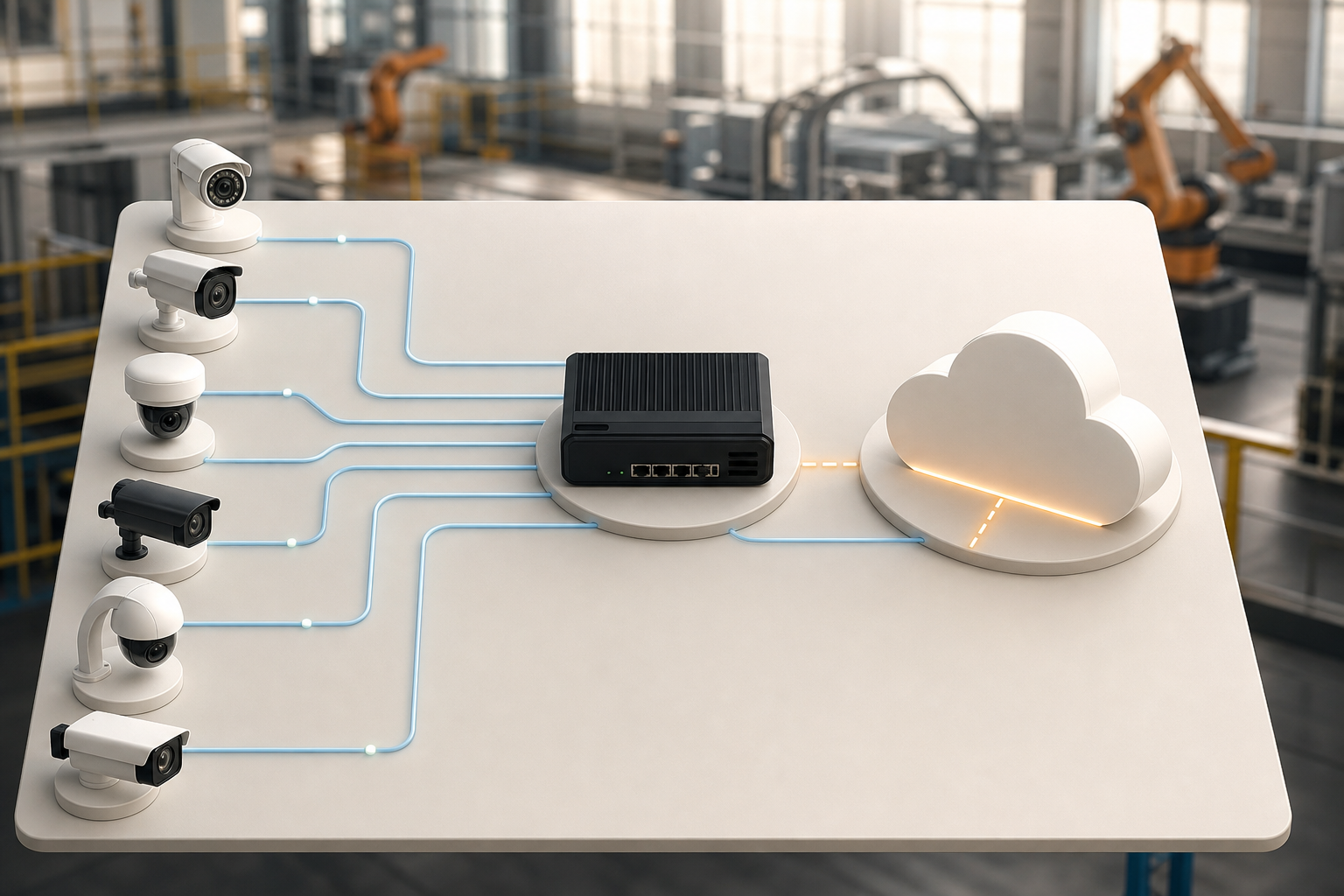
Adding AI means your existing IP cameras keep doing what they do, capture video, while a software analytics layer watches feeds in real time and flags events. You do not need to rip out cameras that already support RTSP or ONVIF. Instead, you point streams to an AI service that detects intrusions, fire/smoke, vehicles, people in restricted zones, and unattended objects, and then sends a timestamped alert with video proof.
This matters because 85% of CCTV footage is never reviewed. Overnight, guards get tired, and key events slip by. On busy lines, smoke or sparks can go unseen for critical minutes. Moreover, upgrades now work with existing cameras across 200+ brands, so mixed fleets are fine. In addition, cloud-based options need no on-premise servers, which cuts lead time and capex.
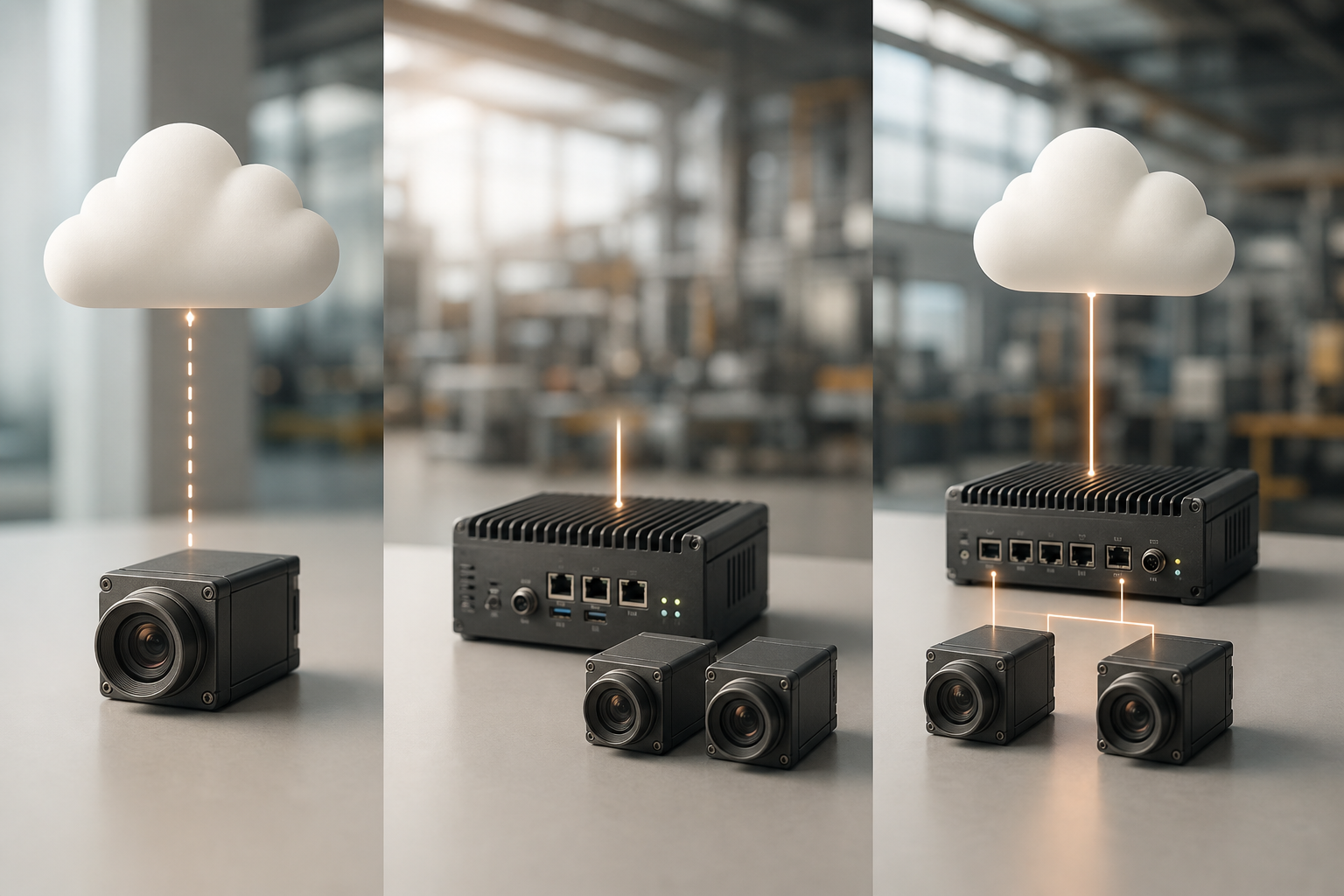
There are three models:
-
Cloud-based AI processing: You stream video to the cloud. It has the lowest upfront cost and fastest rollout. However, it needs reliable uplink bandwidth and stable internet.
-
Edge appliances: You process video on-site on a small server/NVR/GPU box. It reduces latency and cloud egress, but you’ll buy and maintain hardware. – Hybrid: You run time-critical detections at the edge (e.g., intrusion), while less urgent analytics or long retention live in the cloud.
Consider a 120-camera warehouse that only reviewed footage after incidents. With cloud AI, they sent substreams (640×360 at 0.6–1.0 Mbps) to reduce uplink from ~480 Mbps to ~120 Mbps. Alerts for line-cross and smoke arrived in under three seconds. As a result, night shift incidents stopped turning into morning surprises.
Which Model Fits 50–500+ Cameras?
- 50–150 cameras: Cloud is usually fine if you can allocate 60–200 Mbps uplink using substreams.
- 150–300 cameras: Hybrid is common. Run perimeter and fire at the edge; archive analytics in cloud.
- 300–500+ cameras: Edge or hybrid helps contain WAN costs and ensures low latency site-wide.
| Model | Latency | WAN Need | Upfront Cost | Fit by Count |
|---|---|---|---|---|
| Cloud | Low (sub-3s) | Medium–High | Lowest | 50–200 |
| Edge | Very Low | Low | Medium–High | 150–500+ |
| Hybrid | Very Low | Low–Medium | Medium | 100–500+ |
“Cloud-based with no need for on-premise servers” sounds nice, but run the numbers. Your network decides the model, not the brochure.
Also Read!
Best Unattended Baggage Detection for Airports and Transit Stations in 2026
How to Choose Face Recognition and License Plate Camera Software for Retail Stores and Chains
Step-by-Step: How to Add AI Analytics to Your Existing Camera Infrastructure
You can add AI in a week if you prepare well. Use this 6-step process and avoid guesswork. This is the path I follow in plants and warehouses.
Step 1: Audit Your Current Camera Inventory
List brand, model, firmware, resolution, codec (H.264/H.265), and whether the camera speaks RTSP/ONVIF. Note field of view, mount height, and what each camera should “see” in alarms. Flag analog cameras; they’ll need encoders or replacement.
- Tip: Export a device list from your VMS if you have one.
- Goal: Confirm that “it works with existing cameras across 200+ brands” for your mix.
Step 2: Assess Your Network Bandwidth
AI analytics need steady uplink if you go cloud or hybrid. A 1080p stream is about 2–4 Mbps. Substreams at 480p can drop to 0.5–1.5 Mbps with usable AI results.
- Example: 120 cameras × 1 Mbps substream = 120 Mbps uplink.
- Edge model: LAN stays busy, WAN stays light.
- Don’t forget overhead for remote operators and VMS exports.
For protocol background, see Real Time Streaming Protocol (RTSP) and ONVIF on Wikipedia for device discovery and profiles.
Step 3: Define Your Detection Priorities
Pick the detections that match your risks:
- Perimeter intrusion and line-cross at fencing
- Fire/smoke near paint booths, ovens, or CNCs
- Forklift and vehicle movement in loading docks
- Unauthorized access to chemical storage or QA labs
- Unattended objects in production or dispatch zones
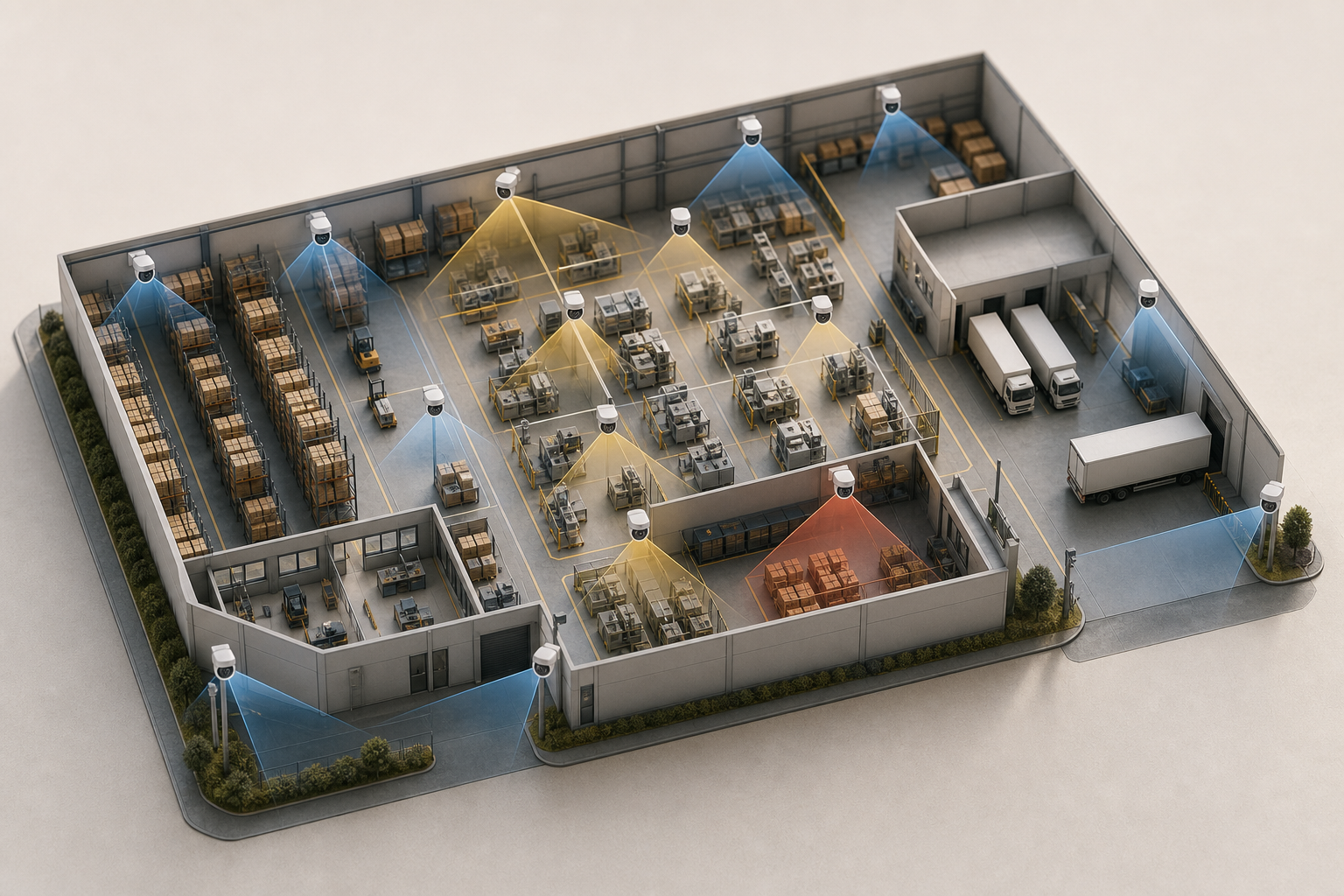
Moreover, use Zone-Based Monitoring to draw virtual zones and focus alerts on where action happens.
Step 4: Choose Your AI Deployment Model
Select cloud (lowest upfront, no servers), edge (lower latency, higher upfront), or hybrid. If your sites are bandwidth-limited, edge wins. If you need to prove value fast across 50–100 cameras, start cloud. Ensure the platform integrates with existing IP-based CCTV systems without additional hardware.
- Cloud perks: Quick rollout, elastic scale, easier updates.
- Edge perks: <3 seconds alert latency and fewer false alarms from jittery networks.
- Hybrid: Best-of-both for large or multi-building campuses.
For supporting context on storage and remote access, see this clear primer on cloud based security cameras.
Step 5: Run a Pilot on 10–20 Cameras
Pick 2–3 zones with different conditions (perimeter, dock, production).
- Detection accuracy by type
- False alarm rate per 24 hours
- Alert latency (target: under 3 seconds)
- Integration with your VMS, access control, and dispatch workflows
Set success criteria up front: e.g., reduce missed after-hours intrusions to zero and cut average response time by 60 seconds.
Step 6: Scale Facility-Wide by Zone
Roll out in phases: perimeter first, then interior, then production floors. Train guards and supervisors on acknowledging alerts and tagging outcomes. Add more detections only after you tune the first two or three well.
For a deeper look at feature trade-offs, this guide to an ai camera system lays out key choices in plain terms.
Camera Audit Checklist (Copy/Paste)
| Location | Camera Brand/Model | Firmware | Resolution/Codec | RTSP/ONVIF | Role (Zone/Detection) | Notes |
|---|---|---|---|---|---|---|
| Dock 1 | Axis P32xx | 10.3 | 1080p/H.264 | Yes/Yes | Vehicle + Line-Cross | Glare at 3pm |
| Perimeter N | Hanwha XNV-6xxx | 1.90 | 720p/H.265 | Yes/Yes | Intrusion | Pole vibrates |
| Oven Line A | Hikvision DS-2CDxxxx | 5.6 | 1080p/H.264 | Yes/Yes | Fire/Smoke | Steam bursts |
5 Mistakes Manufacturing and Warehouse Teams Make When Adding AI to Cameras
Even strong teams trip on the same issues. Here’s what to avoid and how.
1) Turning On Every AI Feature at Once
Aim for 2–3 detections first. For a stamping plant, start with intrusion and fire/smoke. For a DC, start with unauthorized access and vehicle line-cross at docks. Then tune. A platform that hits 99.4% detection accuracy on your top use cases beats 20 half-baked detections you don’t need.
- Practical example: A tire plant enabled object, face, ANPR, intrusion, smoke in week one. False alerts spiked to 90/day. They cut to intrusion + smoke, tuned thresholds, and dropped to 6/day with faster responses.
2) Ignoring Camera Placement and Angles
AI needs the right field of view. A high, wide overview camera won’t read number plates at Dock 7. For face recognition at a badging door, mount 5–6 feet high, straight on, with even light. For forklift detection, keep clear sight-lines at 10–20 meters, not 60 meters.
- Practical example: A warehouse had a camera aimed at the lot. ANPR missed plates due to skew and distance. A 10° tilt and a 12-foot move fixed it.
3) Forgetting Environmental Realities
Dust, steam, glare, and vibration cause false positives. Look for low false alarm rate through pattern recognition and use stabilization where mounts shake. For smoke near ovens, pair visual smoke rules with time-of-day schedules to avoid shift changes triggering alarms.
- Practical example: Steam vents set off smoke alerts every lunch break. Time windows and zone masks solved it.
4) Skipping System Integration
The AI layer should push alerts into what you already use: incident management, access control, radios, or ERP tickets. A new dashboard that no one checks at 2 a.m. won’t help. Use webhooks or VMS plugins so an alert pops where your team lives.
- Practical example: An intrusion alert opened an access control event and paged the rover’s radio. Response time dropped under a minute.
5) Choosing by Feature Count, Not Results
A glossy list of 9 AI detection engines, including face recognition, intrusion detection, fire & smoke detection, object detection, number plate (ANPR), line-cross detection, unauthorized access, unattended baggage, and cashier absence detection, looks great. But results matter more. Tune for your scene. Use customizable time thresholds for detecting unattended items in production. Measure precision and false alarms in your pilot. Then add features.
- Practical example: A DC picked a platform with “everything.” They saw 40+ daily alerts with weak precision. They switched to a vendor with fewer but better-tuned detections and met their KPIs in week two.
Quick fix checklist:
- Start with 2–3 detections, not 10.
- Re-mount 2–3 key cameras for the right angle.
- Mask steam/dust zones and add schedules.
- Feed alerts into your live tools (VMS, access, radios).
- Demand pilot proof, not a brochure.
For more context on camera types and use cases, this guide to an ai security camera breaks down features in plain language.
Also Read!
Best Fire Smoke Detection Security Camera for Corporate Offices and Campuses in 2026
Tools and Platforms for Adding AI to Manufacturing and Warehouse Cameras
You have four paths. Pick based on your camera mix, network, and risk profile, not just a feature sheet.
1) Cloud-Based Platforms (No On-Prem Servers)
These layer AI on top of existing IP cameras and handle processing in the cloud. Tools like VideoraIQ process streams from 200+ camera brands, deliver <3 seconds alert latency, and include engines for intrusion, fire/smoke, unauthorized access, and unattended objects. A common model offers a Starter tier for small businesses with up to 20 cameras, a Professional tier for up to 200 cameras, and an Enterprise tier that supports unlimited cameras and custom models.
- Fit: Fast pilots, multi-site rollouts, and teams without server staff.
- Watch-outs: Uplink sizing and cloud retention policies.
- Trust tip: Check for GDPR compliant and HIPAA compliant claims if you handle regulated goods.
2) Edge Appliance Solutions (On-Prem Processing)
Companies like Briefcam (now part of Canon), Genetec, and Milestone offer appliances or modules that process video locally. You run hardware on-site, keep WAN usage low, and can reach very low latency. This works well for large campuses with strict data policies.
- Fit: 200–500+ cameras, low-latency safety rules, bandwidth-limited sites.
- Watch-outs: Higher upfront cost, patching, and lifecycle planning.
3) Camera-Manufacturer Native AI (Built Into New Cameras)
Axis, Hanwha, and Hikvision ship cameras with on-board analytics. The catch: you’ll usually need to replace older cameras to get these features. That’s fine during natural refresh cycles, but not ideal if you need near-term results across a mixed fleet.
- Fit: Gradual upgrades, capex planned, uniform brand strategy.
- Watch-outs: Vendor lock-in, feature variance across models.
4) Open-Source Frameworks (In-House Build)
Teams with ML engineers can build with OpenCV or TensorFlow. You’ll gain control and custom detections (like PPE compliance for a specific line). However, this path needs sustained dev, MLOps, and data labeling.
- Fit: Large firms with ML budgets and unique scenes.
- Watch-outs: Time-to-value and long-term staffing.
How to Evaluate
- Camera support: Confirm RTSP/ONVIF and your models.
- Detection types: Fire/smoke, intrusion, vehicle tracking, access control ties, PPE compliance.
- Speed and accuracy: Sub-3-second alerts and measured false positive rates in your scenes.
- Compliance and privacy: Review retention, audit logs, and GDPR/HIPAA alignments. See General Data Protection Regulation.
- Scaling: Does it grow from 20 to 200 to 500+ cameras without a redesign?
For a practical, side-by-side discussion of models in another vertical, this comparison read on VideoraIQ vs BriefCam for Airports and Transit Stations: Which Is Better for Adding AI to Existing Security Cameras? highlights trade-offs that also matter in industrial sites.
**Get an instant vendor shortlist →
Key Takeaways
- Keep your cameras. An ai add-on for existing security cameras rides on RTSP/ONVIF and sends real-time alerts without a rip-and-replace.
- Size your network first. Use 0.5–1.5 Mbps per substream for pilots; plan uplink before picking cloud, edge, or hybrid.
- Start small, tune fast. Pilot 10–20 cameras, measure false alarms and sub-3-second alerts, and integrate with your live tools.
- Pick results, not feature lists. A platform with 99.4% accuracy on your top detections beats 20 so-so features.
- Plan by zones. Roll out perimeter, then interior, then production, and use Zone-Based Monitoring to focus on risky areas.
What to Do This Week: Your AI Camera Upgrade Action Plan
Monday. Walk the site. Document every camera: brand, model, firmware, location, current coverage, and whether it supports RTSP/ONVIF. Note analog cameras for encoders or swap. Take a few stills to record angles and light.
Tuesday. Meet IT. Check uplink and LAN headroom. Estimate streaming load: 2–4 Mbps per 1080p, or 0.5–1.5 Mbps per substream. Decide if your current network can support a cloud pilot or if an edge appliance makes more sense.
Wednesday. Set priorities. Pick the top three gaps: perimeter intrusion, fire risk near machinery, unauthorized access to chemical stores, or theft at loading docks. Draw virtual zones and write clear alert rules and schedules.
Thursday. Demo 2–3 platforms. Ask for false positive rates in industrial scenes, proof of integration with your VMS and access control, and confirmation that they integrate with existing IP-based CCTV systems without additional hardware. Confirm they work with your camera brands.
Friday. Draft a pilot. Propose 10–20 cameras for 30 days with measurable success criteria: response time gain, incidents detected vs. missed, false alarm rate under a target. Emphasize that most cloud AI add-ons deploy in days, not months, making the pilot low risk and fast to learn.
As you move, remember: the best ai add-on for existing security cameras is the one that fits your bandwidth, integrates cleanly with your stack, and proves results in your scenes in 2026 and beyond.

