

You already own the sensors you need; you just need them to think. An ai add-on for existing security cameras gives your current CCTV the skills to detect, decide, and alert in real time without ripping and replacing hardware. In 2026, that means cloud analytics that watch your feeds 24/7 and flag what matters, an after-hours stockroom door, a checkout left unattended, a suspicious bag near an emergency exit.
Right now, your NVR records everything and tells you little. AI flips that script. It ingests live streams from your IP cameras, runs detection models tuned for retail risks, and pushes actionable alerts back to your team in seconds. As an LP leader or ops VP, you care about two things: results and disruption. You’ll get the first, and you can control the second with a phased rollout that respects tight store bandwidth, mixed camera ages, and limited on-site IT.
Moreover, the rollout path is practical. You audit what you have, define zone-based use cases by store type, test in a few sites, and then scale. You’ll see faster response to incidents, clearer patterns in shrink, and better use of your existing spend. And because this is a 2026 guide, we’ll keep it real on bandwidth, alert fatigue, data privacy, and what to ask vendors before you sign.
Can You Really Add AI to the Cameras You Already Have?
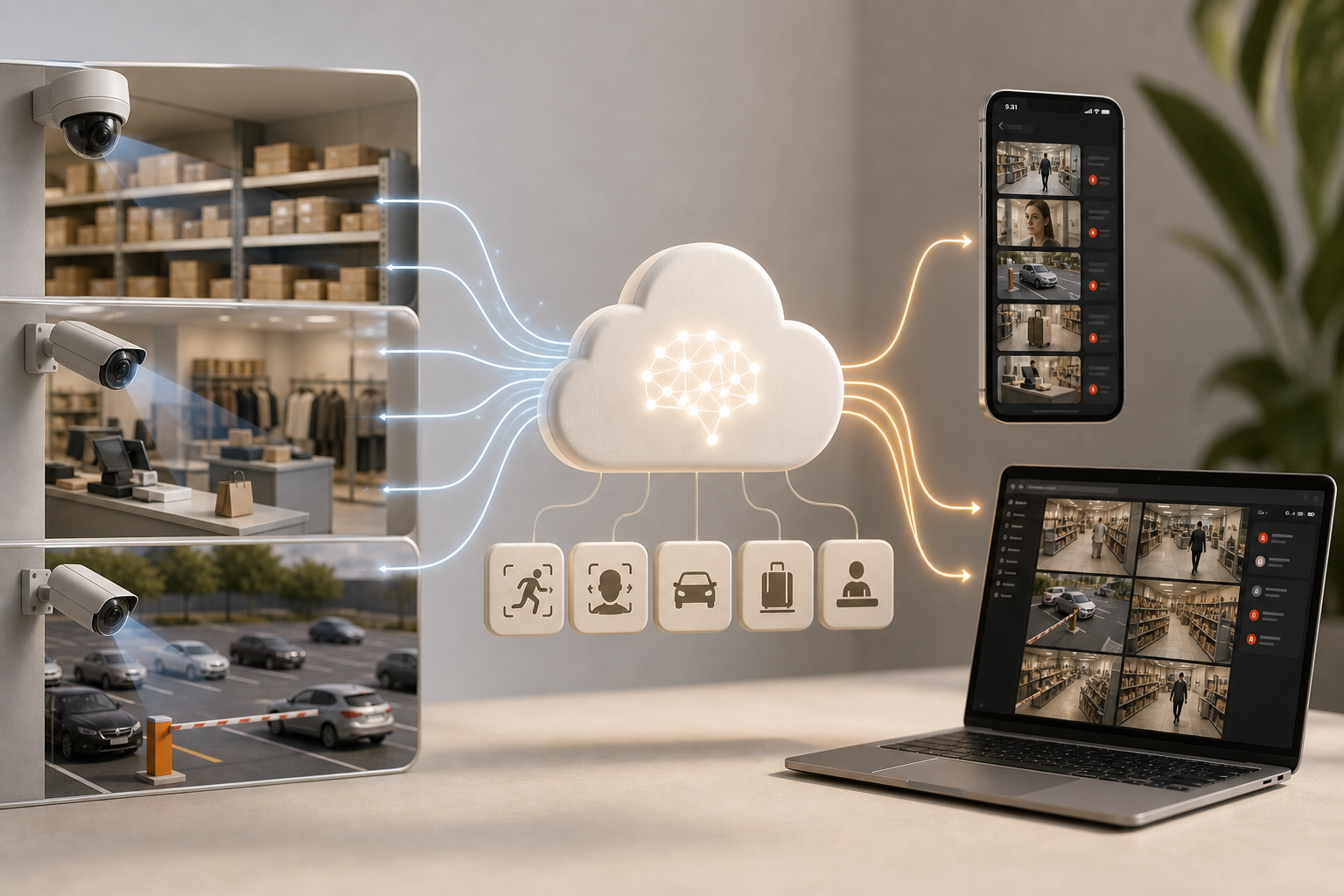
Yes, modern AI video analytics work as a software overlay on existing IP-based CCTV. You stream your current RTSP/ONVIF feeds to the cloud; the platform runs detection engines and sends alerts back with video proof, a location tag, and a timestamp. An ai add-on for existing security cameras turns your passive recorder into an active monitor, without a camera swap.
Here’s how it works in plain terms. Your store cameras keep doing what they do: capture live video. The AI platform connects to those feeds across 200+ brands, analyzes each frame for patterns (people, vehicles, smoke, faces, boundaries), and triggers events in near real time. You don’t need on‑prem servers, the heavy lift runs in the cloud, which means far less disruption at store level.
Retailers with older IP cameras ask, “Do ours qualify?” In most cases, yes. If your cameras speak RTSP and/or ONVIF and have a stable network path, you’re good. If you still have analog in a few corners, you can bridge them with encoders and bring them into scope. The real change is not in the lens, it’s in the software that watches the feed.
Specifically, this closes a gap we all know: a huge share of recorded video is never reviewed. That’s the hole AI fills, it watches for you and only raises a hand when something changes in a zone you care about. As a result, your team shifts from scanning hours of footage to acting on high‑value, timestamped clips.
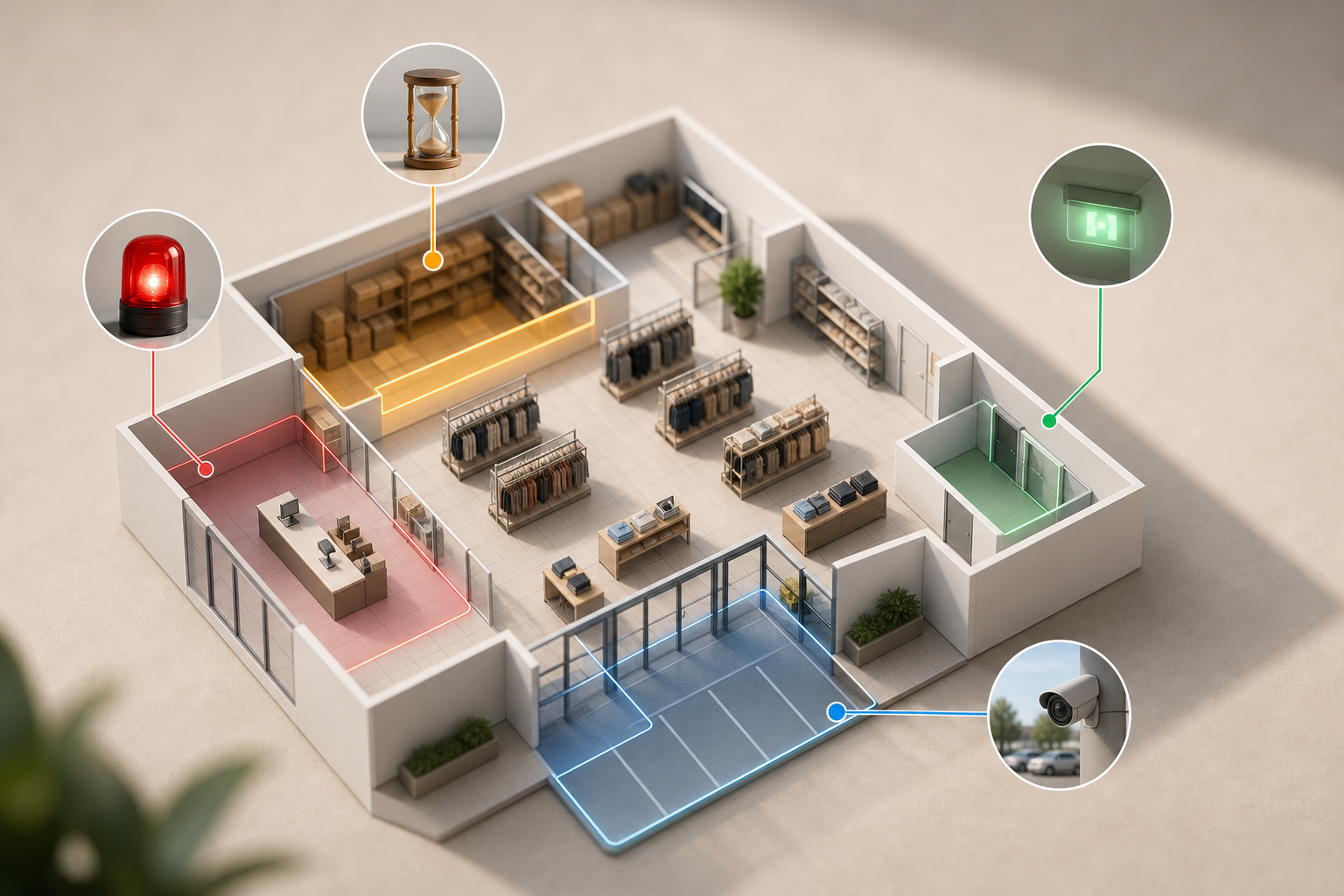
- After‑hours stockroom access: Intrusion and unauthorized access alerts when a back door opens at 2:07 AM.
- Checkout zone monitoring: Cashier absence detection if no staff is present at tills during peak minutes.
- Sales floor risks: Unattended object detection for bags or boxes left in high‑traffic aisles.
- Parking lot incidents: ANPR to flag repeat‑offender plates and line‑cross to guard loading bays.
In addition, if you want a primer on cloud video basics for store networks, this overview on Cloud based security cameras sets the stage for remote sites and low‑touch installs.
Also Read!
Best AI Add-On for Existing Security Cameras for Retail Stores and Chains in 2026
How to Add AI to Existing Security Cameras in Manufacturing Plants and Warehouses
Step-by-Step: How to Deploy AI Video Analytics Across Your Retail Locations
Rolling this out across a chain doesn’t need to be messy. Follow this 7‑step plan that respects tight bandwidth, mixed camera fleets, and scarce store IT time. You’ll use zone-based monitoring, customizable time thresholds, and a dashboard that scales from 20 to thousands of cameras, all with alert latency under 3 seconds.
1.
- Inventory every camera. Note brand, model, firmware, and physical location.
- Confirm IP connectivity plus RTSP/ONVIF support. Flag any analog needing encoders.
- Record current NVR/VMS setup and retention to map ingest paths.
2.
- Flagship: face recognition at VIP entrances, cashier absence at manned counters.
- Small format: intrusion for stockroom and line‑cross at staff‑only hallways.
- Parking lots: ANPR and boundary alerts for docks and curbside pickup zones.
3.
- Calculate upstream needs per camera based on resolution and frame rate.
- Check current WAN upload and peak hours. Reserve headroom for alerts.
- Consider hybrid edge pre‑processing if links are tight or metered.
4.
- Check camera brand support and count of detection engines (aim for nine core engines: face recognition, intrusion, fire/smoke, object detection, ANPR, line‑cross, unauthorized access, unattended baggage, cashier absence).
- Demand <3 seconds alert latency, a multi‑location dashboard, and GDPR/HIPAA compliance.
- Compare cloud vs. on‑prem vs. hybrid. Confirm pricing that scales from 20 to unlimited cameras.
5.
- Choose different layouts and camera densities.
- Set zone-based monitoring and time thresholds per zone (e.g., bag idle >90 seconds).
- Measure false alarms for 30 days and tune sensitivity per scene.
6.
- Give store managers clear alert workflows and escalation rules.
- Provide LP analysts dashboard access and saved views by region.
- Document who responds to what, within how many minutes, with video proof.
7.
- Group stores by region; deploy in weekly waves.
- Apply pilot learnings to default templates by format.
- Turn on heatmaps and analytics to spot hotspots for ongoing plans.
Moreover, this is where an ai camera system approach helps unify policy by format while keeping local nuance. As you scale, keep one north star: alerts must be accurate and arrive fast enough to act, aim for sub‑3‑second delivery from detection to screen.
**Get instant alert templates for your pilot →
5 Mistakes Retail Chains Make When Adding AI to Their Camera Systems
Rolling AI across dozens of sites exposes weak links, in networks, in process, and in habits. Here are five mistakes I see, with real‑world scenarios and fixes you can use next week. I’ll also point to pricing tiers and controls that prevent alert fatigue and vendor lock‑in.
Mistake 1: Turning on every feature on every camera
Scenario: A 60‑camera flagship enables nine engines on all feeds. The team drowns in pings about nothing urgent. Response time drops.
Fix: Start with two or three engines per zone. For example, cashier absence and intrusion at the front half, unattended object in high‑traffic aisles. Expand only after the false alarm rate is low. Low false alarm rate through pattern recognition matters more than raw feature count. An ai add-on for existing security cameras should let you template this by store format.
Mistake 2: Ignoring the network
Scenario: A mall site has spotty upload. Alerts lag or drop during evening peaks, right when incidents spike.
Fix: Run a bandwidth audit and reserve throughput for alert streams. Where links are weak, use edge pre‑processing or reduce camera count in the pilot while you upgrade the circuit. Set alert rules to push small, clipped video proof rather than long streams.
Mistake 3: Skipping the pilot
Scenario: A big‑box layout works fine. The same config rolls to a narrow, high‑glare storefront. False positives soar due to reflections near glass doors.
Fix: Pilot in two to three stores that mirror your range of layouts and lighting. Tune zone masks and time thresholds locally. Make “pilot learnings” a required input before each deployment wave.
Mistake 4: Not training store‑level staff
Scenario: HQ gets alerts; store teams don’t know what to do. Incidents still show up in the morning briefing.
Fix: Train at every level. Store managers need to know where alerts land and how to respond within minutes. LP gets dashboards and reviews patterns weekly. Set escalation paths with names and time targets. Add video proof to each alert so teams can act fast.
Mistake 5: Picking a platform that can’t scale
Scenario: One store with 20 cameras hums. As you add sites, there’s no unified view, and licensing becomes a maze.
Fix: From day one, test multi‑location management and tiered pricing. Look for a Starter tier for up to 20 cameras, a Professional tier up to 200, and an Enterprise tier with unlimited cameras and custom models. Ensure the vendor supports heatmaps & analytics for planning, and that you can standardize templates by region.
- Quick checks before rollout:
- Confirm GDPR compliance for stores that require it.
- Validate alert latency in a live test during peak hours.
- Review audit logs and user roles in the dashboard.
- Document a one‑page SOP per zone with screenshots.
Also Read!
Best Unattended Baggage Detection for Airports and Transit Stations in 2026
How to Choose Face Recognition and License Plate Camera Software for Retail Stores and Chains
AI Video Analytics Platforms Worth Evaluating for Retail
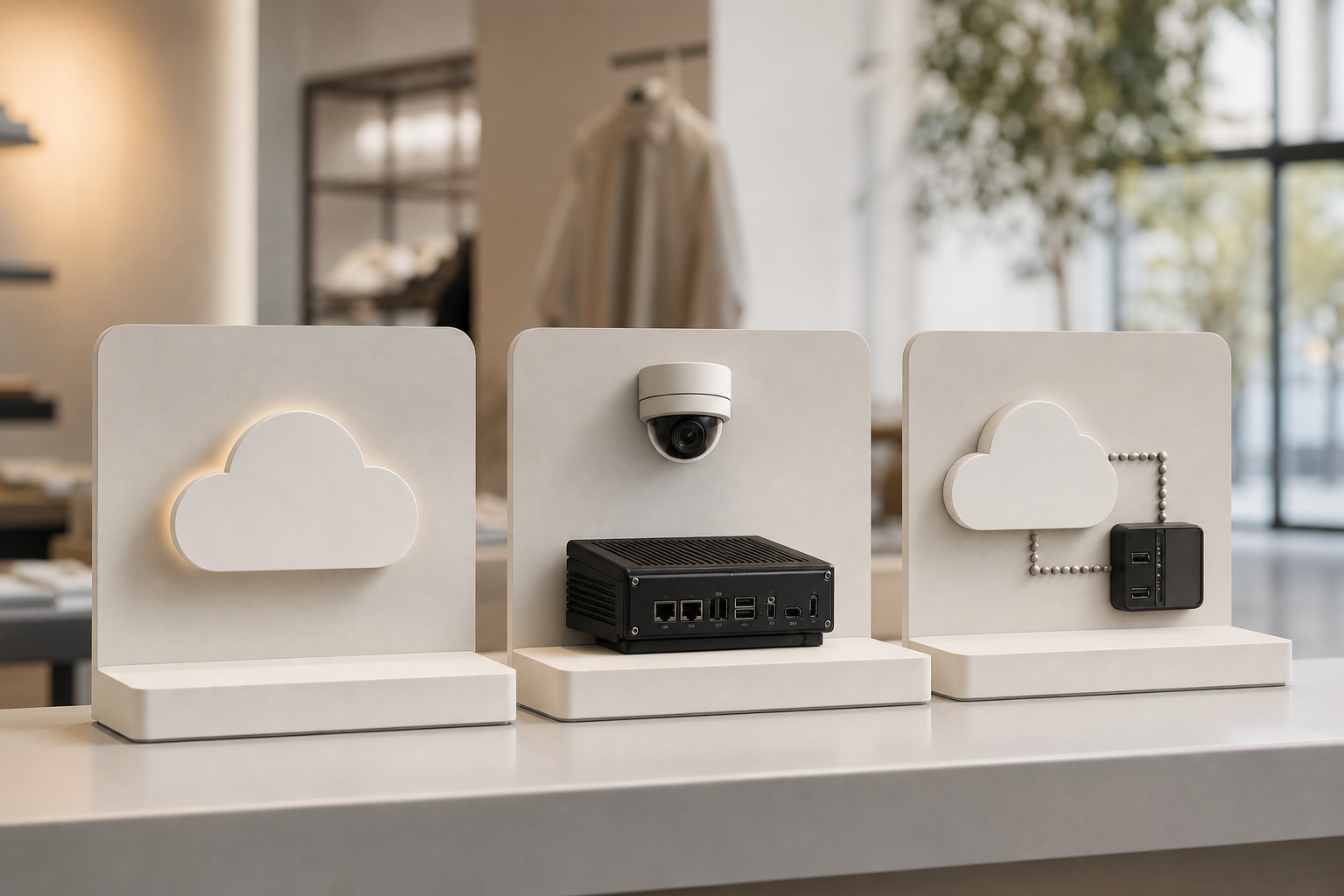
You have three practical approaches in 2026: cloud‑native, edge appliances, and hybrid. The right choice depends on your current cameras, WAN health, and how fast you want to scale. Keep your evaluation grounded in proven accuracy, alert speed, compliance, and total cost of ownership, not slideware.
1) Cloud‑native platforms (no on‑prem hardware)
These ingest your RTSP feeds to the cloud, process detections, and return alerts with video proof. Tools like VideoraIQ (one option among several) work with existing cameras across 200+ brands, offer nine detection engines including retail‑specific ones like cashier absence detection, and deliver <3 seconds alert latency. For scale confidence, note platform‑level signals such as 10,000+ cameras monitored, 99.4% detection accuracy, and deployments in 7+ countries, plus GDPR and HIPAA compliance. Pricing is tiered from small stores to unlimited enterprise deployments, so you can pilot in weeks and then scale by region.
2) Edge‑based appliances (NVR add‑ons or dedicated boxes)
Vendors such as Briefcam, Agent Vi, or Hanwha’s Wisenet AI provide on‑site processing. The trade‑off: higher upfront hardware and local upkeep, but lower backhaul bandwidth since analytics run on the box. This suits sites with tight or metered uplinks, or policies that keep video inside the building.
3) Hybrid (edge pre‑processing + cloud analytics)
Hybrid paths push light pre‑processing to the edge (e.g., stream thinning, motion triage) and run AI models in the cloud. You save bandwidth while keeping central control, cross‑site analytics, and remote updates.
What to ask each vendor during evaluation:
-
Detection accuracy on your scenes, with recorded clips. Ask for false positive rates by engine. – Integration with your VMS and SSO. Can you view alerts in your existing workflow?
-
Multi‑site management: roles, audit logs, and chain‑wide policy templates. – Compliance and privacy: GDPR and HIPAA documentation, data paths, and retention controls. For context, review GDPR Article 5 principles to align processing with purpose and storage limits. – Total cost of ownership over 3 years: licenses, any edge hardware, storage, and support.
For a focused comparison of cloud analytics strategies in transit settings that map well to retail, this head‑to‑head is useful: VideoraIQ vs BriefCam for Airports and Transit Stations: Which Is Better for Adding AI to Existing Security Cameras?. The same trade‑offs apply to chains with mixed networks and layouts.
What to Do This Week: Your AI Camera Upgrade Action Plan
You don’t need six months to start. Here’s a one‑week plan that respects store time and gives you data to move fast.
- Monday: Pull or create your camera inventory spreadsheet. List every camera with brand/model, IP status, and how it records today (NVR/VMS, retention, location).
- Tuesday–Wednesday: Walk your top three high‑shrink or high‑risk stores. Mark zones for each AI engine: checkout areas, stockrooms, emergency exits, parking lots, and high‑traffic aisles. Note lighting and glare.
- Thursday: Have IT run an upload audit at those stores. Measure current use and available headroom during peak hours. Decide if you need edge pre‑processing in any site.
- Friday: Shortlist two to three AI vendors that support your brands and zones. Send an RFI with pilot terms for two stores, asking for <3 seconds alert latency, GDPR/HIPAA compliance, and multi‑site dashboards. Reference your zone map and SOP.
As a final note, an ai add-on for existing security cameras is one of the highest‑ROI upgrades because it extracts new value from hardware you already paid for. Start small, focus on alerts you’ll act on, and scale with clear rules. You’ll see faster responses and cleaner incident data within weeks.
**Start instant alerts today →
Key Takeaways
- You can add cloud AI to 200+ brand IP cameras — no swap, no on‑prem servers.
- Start with 2–3 engines per zone (e.g., cashier absence, intrusion) to avoid alert fatigue.
- Pilot in two to three varied stores, tune thresholds, and prove <3 seconds alert delivery.
- Pick a platform that’s GDPR/HIPAA compliant and scales from 20 to unlimited cameras.
- Use heatmaps and analytics to guide staffing, layouts, and long‑term security plans.
To go deeper on modern cloud setups across remote sites, this primer on Cloud based security cameras pairs well with the step‑by‑step plan above.

