

4K video packs four times the pixels of 1080p, which pushes your network and storage hard (Source: 4K resolution). To avoid wasted spend and spot incidents fast, choose wired security cameras that give you stable power, steady bandwidth, and clear footage. This 2026 guide gives you a practical path: what “wired” actually means, how to design a system step by step, and how to add smart alerts without ripping out what you already have.
You’ll see clear tradeoffs. Wired systems cost more to install, but they pay you back with reliability and higher image quality. Wireless works for quick installs and rentals, yet it can drop frames and struggle with 4K or multi-camera setups. The goal here is simple: help you design a system you can trust at 2 a.m., not just at noon during perfect Wi‑Fi.
Moreover, you’ll learn how to plan coverage, pick cable types, right-size storage, and add AI that turns raw video into real-time alerts. As a result, you can start small this week and scale with confidence across a home, a store, or a multi-site business.
What Are Wired Security Cameras and Why Do They Still Dominate?
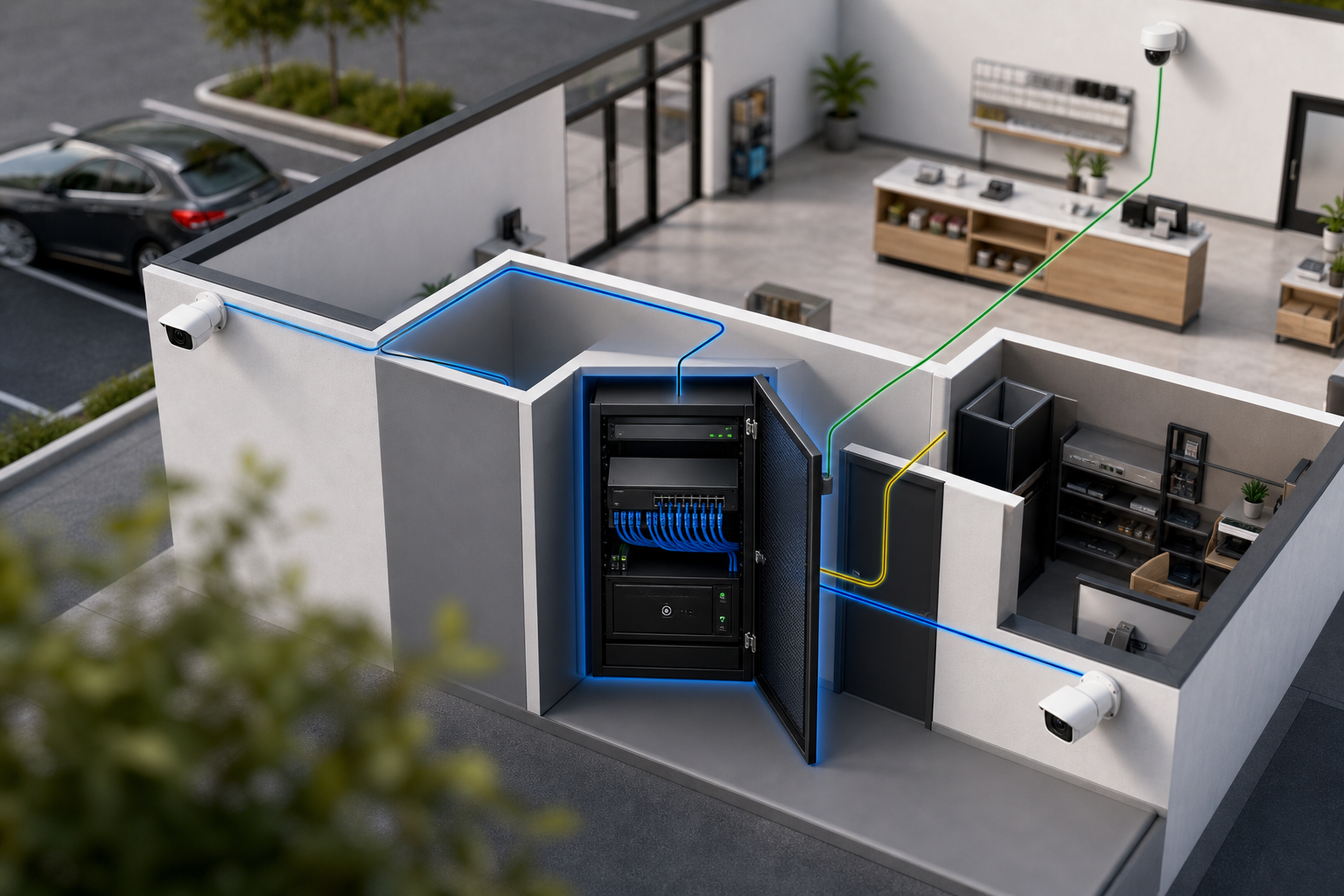
Wired cameras send video over a physical cable and draw power through that cable or a nearby outlet. Three common setups exist. First, IP cameras use Ethernet and often pull power through Power over Ethernet (PoE), so one Cat5e/Cat6 cable handles both data and power. Second, analog HD cameras (TVI/AHD/CVI) use coaxial cable to a DVR, with power from a separate line. Third, hybrid encoders let you bridge older coax cameras into an IP network.
Compared to wireless, wired wins on reliability. You get no Wi‑Fi interference, no channel congestion, and no “dead zones” from thick walls. In addition, PoE delivers steady power, so you avoid battery swaps and brownouts that corrupt video files. Higher bandwidth also means clean 1080p and 4K streams, which matter for faces, plates, and court‑ready evidence.
On the other hand, wires add labor. You need to plan runs, drill, and terminate connectors. For many homes and small offices, a weekend is enough. For warehouses, campuses, or hospitals, you’ll want a trained installer. The reward is a system that performs the same on a rainy night as it does at noon.
Cabling options at a glance
- Ethernet (Cat5e/Cat6) with PoE: one cable for power + data, flexible, 100 m per run.
- Coax (RG59/RG6) to DVR: good reuse of legacy lines, separate power required.
- Fiber uplinks: for very long runs or multi-building sites, with PoE switches at edges.
Furthermore, these choices affect cameras you can add later. If you expect to expand beyond eight cameras, PoE switches and an NVR give you more headroom. That’s one reason security teams still prefer wired in 2026.
Also Read!
How to Choose a Smoke Detector Camera for Your Home or Business
Step-by-Step Guide to Choosing the Right Wired Camera System
Before you buy, map your needs. Then match cable type, video resolution, storage, and smart features to that plan. If you do it in this order, you avoid rework and surprise costs. Use this section as your checklist to choose wired security cameras and the ecosystem around them.
Coverage and cabling
-
Assess coverage and camera count
Start with a site walk. List key zones: doors, cash wraps, parking entries, server rooms, and any remote gates. For small spaces, plan 1 camera per 400–800 sq ft indoors, and 1 per entrance outdoors. For driveways or lots, add a plate camera facing inbound traffic. -
Choose your cable type (PoE vs.
If you’re starting fresh, pick PoE IP cameras over Cat6. You’ll get simpler power and easier expansion. If you already have good coax runs, HD-over-coax to a DVR can save thousands on re-cabling. However, confirm you can get the frame rate and night vision you need before you commit.
Resolution and storage
-
Pick a clear resolution target
1080p suits most indoor rooms. For identification at distance or for courts, use 4K on entrances and key choke points. Moreover, match lens and field of view to the task: narrow for plates and doorways, wide for lobbies. Higher resolution demands more storage and network bandwidth, so plan for it now. -
Decide on storage (NVR/DVR/cloud)
An NVR (for IP) or DVR (for coax) on-site gives you local control and no monthly fees. Cloud adds off-site backup and remote access. For many, a hybrid model works: local recording for 30–90 days and event clips mirrored to the cloud. Ensure your NVR can handle your total bitrate and camera count.
AI and installation
-
Evaluate smart features (AI detection and alerts)
Don’t treat cameras as passive. Add analytics that can detect people, vehicles, plates, smoke, and more. Look for platforms that send real-time alerts with video proof, a location tag, and a timestamp. Even better, pick a solution that works with existing cameras across 200+ brands and includes 9 AI detection engines to reduce false alarms. -
Plan installation and cable routes
Sketch cable paths from each camera back to your network closet. Avoid high-voltage lines to prevent interference. In addition, plan PoE switch capacity (ports and power budget) and UPS backup to ride through outages. Label both ends of every cable. Future you will thank you.
Visualize your build
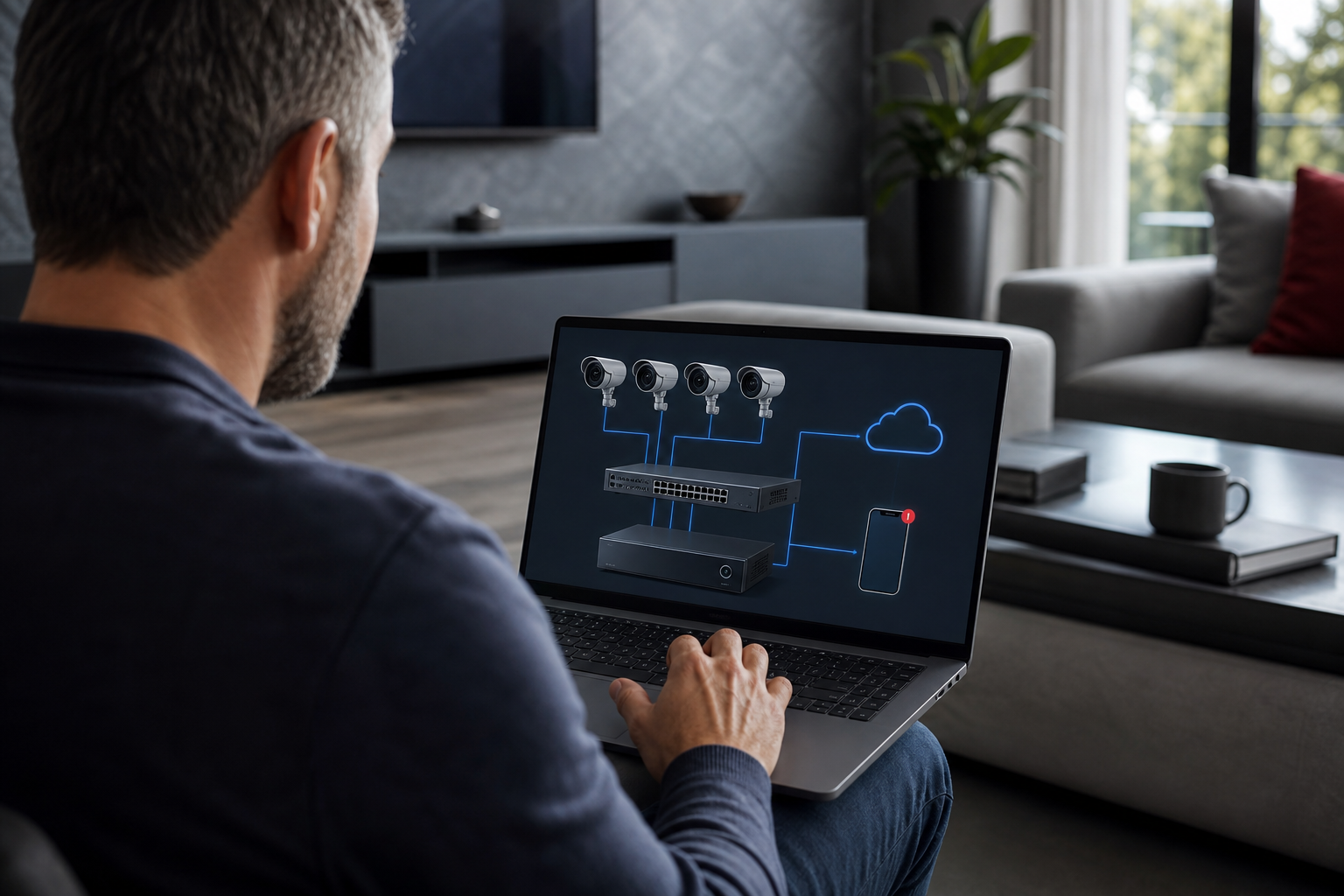
Finally, pressure-test your plan. For example, if you need 30 days of 4K retention for 12 cameras at 8 Mbps each, calculate the storage now, not after install. That single step prevents the “day 18 overwrites the evidence” surprise.
**Get a no-pressure system review →
5 Common Mistakes When Buying Wired Security Cameras
Even smart buyers hit the same traps. Here’s how to avoid them as you choose wired security cameras for a home or a business site.
Cost and capacity
-
Ignoring cable infrastructure costs
Cameras are the small line item. Labor, lifts, conduit, patch panels, and PoE switches add up fast. Price cable runs per drop and compare PoE vs. coax reuse to see the true total. -
Buying 4K everywhere without planning storage
Ultra-HD looks great, but it eats storage. Record 4K at key points (entrances, cash areas) and set 1080p elsewhere. Then tune frame rate and motion-triggered recording to stretch retention without losing evidence.
Low light and scale
-
Skipping night vision details
Ask for minimum light specs in lux with IR on and off. Moreover, check real test clips at night. A 4K camera with weak IR gives you clean blur. A 1080p sensor with strong low-light might show faces that a high-res sensor misses. -
Overlooking future scalability
If you may add 8 cameras next year, size the NVR, PoE power budget, and rack space now. Therefore, choose switches with extra ports and plan spare fiber or Cat6 trunks between buildings.
AI and oversight
- Treating cameras as passive, no AI review
According to VideoraIQ, 85% of CCTV footage is never reviewed. Without analytics, incidents hide in hours of video. Add AI to scan frames in real time and alert your phone. Otherwise, your “evidence” exists, but no one sees it until it’s too late.
"We went from finding out about incidents in the morning briefing to being notified in real time. That one 2 a.m. alert paid for the platform." — Ananya Mehta, Head of Facilities, 200‑Camera Corporate Campus
Moreover, confirm privacy and compliance. Platforms with GDPR and HIPAA compliance help you meet security and data governance needs, especially in healthcare and education.
Also Read!
How to Choose Fire and Smoke Detection Security Cameras for Airports and Transit Stations
How to Choose Fire and Smoke Detection Security Cameras for Retail Stores and Chains
Tools and Software That Make CCTV Smarter
Hardware sets the baseline. Software makes the system proactive. You have three broad choices, and you can mix them.
-
NVR software you host: Tools like Blue Iris or Milestone run on your PC/server and record IP streams. You get fine control and on-prem storage. However, you manage hardware, updates, and remote access security.
-
Cloud camera platforms: Products like Google Nest or Verkada bundle hardware with cloud storage and built-in apps. Setup is simple. On the other hand, you trade flexibility for vendor lock-in and monthly fees per camera.
-
AI analytics layers that sit on top of existing cameras: These connect to your current IP-based CCTV and add real-time detection, search, and alerts. One option is VideoraIQ, which integrates with existing IP-based CCTV systems without additional hardware. It is cloud-based with no need for on-premise servers, delivers <3 seconds alert latency, and reports 99.4% detection accuracy. It also sends real-time alerts with video proof, location tags, and timestamps, and it works with cameras across 200+ brands.
"Our fire was detected 52 seconds before our smoke alarm triggered. The alert came with a live camera link—my team was already on the way." — Nilesh Kapoor, Plant Safety Supervisor, Manufacturing Facility (480 cameras)
In 2026, you can tailor AI to your site. For example, if you run retail or transit, start with focused guides on fire and smoke analytics: How to Choose Fire and Smoke Detection Security Cameras for Retail Stores and Chains and How to Choose Fire and Smoke Detection Security Cameras for Airports and Transit Stations. Furthermore, look for security claims that matter: GDPR compliant and HIPAA compliant are strong signals for sensitive environments. Social proof helps too, platforms monitoring 10,000+ cameras across 7+ countries show maturity under different conditions.
Key Takeaways
You’ve seen how to choose wired security cameras based on your space, risks, and growth plan. Use these points as your short list before you buy or call an installer.
- Wired beats wireless for reliability, steady power, and bandwidth, especially for 4K and multi-camera sites.
- Plan in this order: coverage map → cable type → resolution → storage → AI features → installation routes.
- Mix 4K at choke points with 1080p elsewhere to balance clarity and retention costs.
- Add AI alerts so incidents don’t hide in hours of video; aim for fast (<3 seconds) notifications with video clips and timestamps.
- Verify compliance and scale: GDPR/HIPAA claims, camera brand support, and cloud options without on‑prem servers reduce friction in 2026.
Moreover, budget holistically. Include cable runs, PoE switches, UPS, and labor in your math. As a result, your “final invoice” won’t surprise you. Finally, test night clips, plate reads, and motion detection on one or two cameras before you roll out 20 or 200. A small pilot reveals 90% of fit issues at 10% of the cost.
What to Do This Week: Your Action Plan
You don’t need to rebuild everything at once. Start small, learn fast, then scale.
- Walk your site and mark 6–12 “must-cover” zones. Take photos and note distances.
- Sketch cable routes to a central closet. Count PoE ports and estimate total power (add 30% headroom).
- Pick two cameras to pilot: one 4K at a main door and one 1080p in a room. Record for seven days.
- Set motion zones and alerts. Confirm you get real-time clips with location and timestamps on your phone.
- Trial one AI analytics layer for a week on your pilot cameras. Check people/vehicle/plate alerts and false alarms.
- Request quotes from 2–3 licensed installers with your sketch and pilot findings. Compare “per drop” costs and retention days, not just headline camera prices.
As you choose wired security cameras for a broader rollout, keep your pilot settings as your baseline. Then adjust lens, bitrate, and retention per zone. For risk-heavy areas (cash wraps, server rooms, transit platforms), use the focused guidance here: How to Choose Fire and Smoke Detection Security Cameras for Retail Stores and Chains and How to Choose Fire and Smoke Detection Security Cameras for Airports and Transit Stations.
Finally, write down what “good” looks like for you in 2026: alert speed, clip quality, and retention days. Share it with your installer and your software vendor so everyone builds to the same target.